Most synth plugins feel like variations on the same theme — oscillators, filters, envelopes, repeat. Anukari 1.1 ignores all of that. This is a 3D physics simulation that makes sound by letting you build virtual instruments from masses, springs, and now — in this landmark update — resonating strings, tubes, plates, and bells. The verdict? If you want sounds nobody else has, this is the most genuinely unusual synthesizer available right now.
What Is Anukari, Exactly?
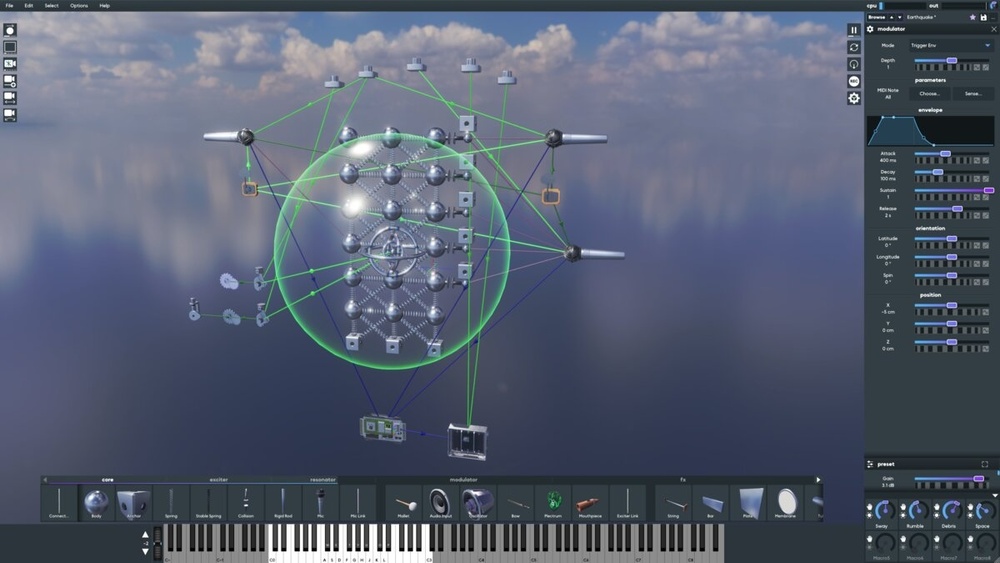
Think of it this way: instead of drawing waveforms, you build physical objects. You place virtual masses, connect them with springs, and strike them with mallets, bows, or plectrums — or blow air through them like a wind instrument. Virtual microphones pick up the result. The whole thing happens in a live 3D world you can see and interact with in real time.
It runs as a VST3, AU, AAX, or LV2 plugin — or in standalone mode without a DAW. It supports MIDI, MPE, and audio input, so you can run external audio through your spring constructions as a wild effects processor. If you want to know more about setting up your DAW for plugins like this, check out our guide to the best DAWs for music production.
What’s New in Anukari 1.1
| Feature | Detail |
|---|---|
| New Resonator Types | Strings, bars, plates, membranes, tubes, bells |
| Mouthpiece Exciter | Blow into instruments like a clarinet or trumpet |
| The Modulosphere | Animated sphere that modulates whatever it touches in 3D space |
| New Spring Types | Colliding/rigid springs for wind chimes, rattles, clattering machines |
| Build Tools | Generate whole shapes, duplicate pieces in patterns |
| MCP Support | AI assistants can build instruments in Anukari (no AI built in) |
| New Presets | 1,000+ across four new banks, including orchestral instruments |
| Preset Browser | Redesigned with search and filters |
| Platform Support | Windows 10+, macOS 12+, Linux (2022+) |
| Price | $74 USD (intro) / $149 regular — free for existing owners |
The Part the Press Release Glosses Over
Here’s what Anukari doesn’t tell you upfront: the learning curve is real. Building instruments from physics simulations is genuinely unlike anything else in a DAW. There’s no visual patch cable or familiar filter knob to grab onto. The entire paradigm is spatial and physical.
That’s exactly why the 1.1 build tools matter. Large structures used to require building piece by piece — tedious work for complex sounds. The new pattern and shape generators finally address that pain point. The 1,000+ new presets help too. They’re not filler — they showcase the new resonators properly and give you a solid jumping-off point.
Also worth noting: Anukari uses your GPU for processing. That’s unusual and smart — it keeps CPU load low enough to run multiple instances. But it does mean older integrated graphics could become a bottleneck. That’s not documented prominently anywhere.
How Does It Compare to the Competition?
The closest competitor in the physical modeling space is Chromaphone 3 by AAS. Chromaphone is polished, approachable, and sounds fantastic. But it doesn’t give you a live 3D environment to work in — you’re adjusting parameters on a panel, not building something you can see move.
If you’re coming from Native Instruments’ Massive XL or any standard wavetable synth, Anukari won’t replace your go-to leads and basses. It’s a completely different tool for completely different sounds — think resonant percussion, evolving textures, sympathetic vibrations, and experimental orchestral timbres that feel alive.
At $74 on intro pricing, the value gap vs. Chromaphone ($99) is slim. But Anukari’s depth — especially post-1.1 — makes it the more ambitious long-term investment. To get the most from it, make sure your studio headphones can reveal the fine textural detail this synth produces.
Who Should Actually Buy Anukari 1.1?
✓ Buy This If…
- You make ambient, cinematic, or experimental music and need textures nobody else has
- You’re a sound designer who wants a genuinely new palette — not another preset pack
- You already own a solid core synth and want something that expands into completely different territory
- You love the idea of physical modeling but find Chromaphone 3 too limited
- You’re on a budget and want to grab the $74 intro price before December 4th
✗ Skip This If…
- You need a workhorse synth for standard bass, lead, and pad sounds quickly
- Your GPU is older integrated graphics — performance could suffer
- You’re a complete beginner without a DAW workflow yet — start with a MIDI keyboard controller and your DAW’s built-in instruments first
- You want something that sounds immediately “musical” out of the box without exploration
The Modulosphere: The Coolest Thing in Any Synth Right Now
Anukari’s creator Evan Mezeske calls the Modulosphere his favourite addition — and it’s hard to argue. It’s a sphere that floats through the 3D scene and applies modulation to every object within its radius. Move it closer to a string, and that string responds. Move it away, and the effect fades. It’s a form of modulation that only makes sense in three dimensions. No other synthesizer on the market does anything like this.
Anukari 1.1 is the rare plugin update that genuinely expands what’s possible — not just what’s available. The 1,000+ new presets, the resonators, the Modulosphere: this isn’t a patch. It’s a new instrument. And at $74 intro pricing, it’s the kind of sound design gamble that pays off for curious producers willing to put in the exploration time.
Want to build a studio setup that makes the most of creative tools like Anukari 1.1? Start with a solid foundation — check out our best audio interface guide and our complete recording studio equipment checklist to make sure everything works together.
Does Anukari 1.1 look like a winner to you, or is the hands-on learning curve too steep for your workflow? Let us know in the comments below.