


Finding the right MIDI keyboard controller can feel overwhelming with so many options on the market. At Studio Gear Experts, we’ve spent hands-on time with the latest models across every price range — testing keybed feel, pad sensitivity, DAW setup ease, and software bundle value — so you don’t have to guess. Whether you’re a bedroom producer looking for a first controller or a seasoned pianist who demands full 88-key hammer action, this guide has a definitive pick for you.
This list has been fully updated for 2026 with the newest model generations, replacing outdated hardware with current releases. Read on for our tested picks, a comprehensive buying guide, and a quick interactive tool to help you choose in seconds.
Quick Recommendations at a Glance
Use the table below to jump straight to the best MIDI keyboard for your specific need. Every pick links to a full review section below.
| Award | Product | Keys | Approx. Price |
|---|---|---|---|
| 🏆 Best Overall | Novation Launchkey 61 MK4 | 61 Semi-Weighted | ~$249 |
| 🎹 Best for Beginners | Akai MPK Mini IV | 25 Mini | ~$119 |
| 💰 Best Budget (Under $100) | Nektar SE49 | 49 Full-Size | ~$69 |
| 🎛️ Best for Analog & Modular Synths | Arturia KeyStep Pro | 37 Slim | ~$399 |
| 🎵 Best for FL Studio | Novation FLkey Mini | 25 Mini | ~$99 |
| ⭐ Best Premium Mini | Arturia MiniLab 3 | 25 Slim | ~$99 |
| 🎼 Best 88-Key / Weighted | NI Komplete Kontrol S88 MK3 | 88 Weighted (Fatar) | ~$999 |
| 🎚️ Best for Studio Production | Arturia KeyLab Essential 61 | 61 Semi-Weighted | ~$299 |
| 🎹 Best Simple 88-Key | M-Audio Keystation 88 MK3 | 88 Semi-Weighted | ~$199 |
| 🏅 Best Piano Action | Kawai VPC1 | 88 Wooden Grand Feel | ~$2,499 |
Find Your Perfect MIDI Keyboard — Interactive Quiz
Not sure which controller is right for you? Answer three quick questions and we’ll point you to the right section:
Which MIDI Keyboard is Right for You?
1. What is your primary use case?
The Best MIDI Keyboard Controllers — In-Depth Reviews
1. Novation Launchkey 61 MK4 — Best MIDI Keyboard Overall

| Feature | Details |
|---|---|
| Keys | 61 semi-weighted waterfall |
| Pads | 16 FSR pads with polyphonic aftertouch |
| Faders | 9 |
| Connectivity | USB-C, 5-pin MIDI Out |
| Price | Approximately $249 |
The Novation Launchkey 61 MK4 is the best MIDI controller you can buy for the money, and it’s not particularly close. This is a major generational leap over the MK3: the new semi-weighted waterfall keybed has a genuinely satisfying feel that sits between a synth action and a light piano touch, and the 16 FSR (Force Sensing Resistor) pads with polyphonic aftertouch make it one of the most expressive controllers in its price class. An integrated OLED display shows chord information in real time, a genuinely useful feature during live performance.
DAW integration is where the Launchkey 61 MK4 truly shines. It works out of the box with Ableton Live, Logic Pro, FL Studio, Cubase, Reason, and Ardour, with clip launching, mixer control, and instrument browsing all working without any setup. The included software bundle — Ableton Live 12 Lite, instruments from GForce, Orchestral Tools, Klevgrand, and a 5-pin MIDI Out for hardware synths — makes this exceptional value. If you use any major DAW, this is the controller that integrates most seamlessly across all of them.
Pros:
- Best-in-class DAW integration: Works natively with 7 major DAWs, including clip launching in Ableton and FL Studio step sequencer control.
- Polyphonic aftertouch pads: A rare feature at this price point, adding serious expressive capability.
- OLED chord display: Tells you exactly what chord you’re playing in real time — invaluable for producers still learning theory.
- 5-pin MIDI Out: Connect directly to hardware synths without a computer.
Cons:
- No aftertouch on keys: Only the pads support polyphonic aftertouch, not the keybed itself.
- Size: 61 keys is the minimum for some classical repertoire; pianists may want 88.
2. Akai MPK Mini IV — Best for Beginners & Portability

| Feature | Details |
|---|---|
| Keys | 25 mini velocity-sensitive (Gen-3 keybed) |
| Pads | 8 RGB MPC pads |
| Knobs | 8 × 360° assignable encoders |
| Connectivity | USB-C, full-size MIDI Out |
| Price | Approximately $119 |
The world’s best-selling compact MIDI controller just got significantly better. The Akai MPK Mini IV replaces the MK3 with a Gen-3 keybed that finally adds true pitch and modulation wheels (not a joystick), USB-C connectivity, a full-color OLED screen, and 360° endless encoders in place of the old fixed knobs. The bundled Studio Instrument Collection includes over 1,000 pro-grade sounds from AIR, Akai Pro, and Moog, meaning new producers can make music immediately without buying additional software.
The MPK Mini IV also ships with Ableton Live Lite 12, Logic Pro templates, FL Studio templates, and NKS (Native Kontrol Standard) compatibility for use with Native Instruments plugins. It’s also the first MPK Mini to include a full-size 5-pin MIDI Out, making it possible to trigger hardware synths directly. For any bedroom producer or traveling musician who wants a truly pocketable setup, this remains the gold standard. Pair it with one of our recommended audio interfaces for a complete starter rig.
Pros:
- USB-C and MIDI Out: Modern connectivity on a compact controller, finally.
- Real pitch and mod wheels: A major upgrade from the MK3’s joystick for expressive playing.
- Huge software bundle: 1,000+ sounds out of the box means you can start producing right away.
- NKS-ready: Seamless integration with Native Instruments Komplete libraries.
Cons:
- Mini keys: The 25-key mini format isn’t ideal for players with larger hands or those coming from a piano background.
- No faders: Mixer control requires using the encoders, which isn’t as intuitive as dedicated faders.
3. Nektar SE49 — Best Budget MIDI Keyboard Under $100

| Feature | Details |
|---|---|
| Keys | 49 full-size velocity-sensitive (synth action) |
| Controls | Pitch bend & mod wheels, assignable fader, transport buttons |
| Connectivity | USB (class-compliant, no driver needed) |
| Price | Approximately $69 |
If your budget is tight, the Nektar SE49 is the most competent sub-$100 MIDI controller available in 2026 — and it’s genuinely surprising how much you get for the price. Unlike most cheap 49-key controllers that feel flimsy and lack DAW integration, the SE49 features Nektar DAW Integration software that gives you transport control and track selection in Bitwig, Cubase, GarageBand, Logic, FL Studio, Reason, Reaper, and Studio One. The synth-action keys have a firm, defined feel, and the large pitch-bend and modulation wheels offer proper resistance. It ships with Bitwig 8-Track as a free DAW to get you started.
The even more portable Nektar SE25 (25 mini keys, ~$49) is worth considering if desk space or bag space is a primary concern. Both models are plug-and-play with no drivers required on Mac or Windows, making them genuinely hassle-free entry points into music production. Check out our recording studio equipment checklist to see what else you might need alongside your first MIDI keyboard.
Pros:
- Incredible value: 49 full-size keys with DAW integration for under $70 is genuinely remarkable.
- Driver-free: Plug in and play immediately on any Mac or Windows PC.
- Bitwig 8-Track included: A legitimate DAW to get started with, not just a demo.
Cons:
- No drum pads: Beat-makers will need to look elsewhere for dedicated pad performance.
- Basic build: The plastic chassis is functional but won’t survive heavy touring use.
4. Arturia KeyStep Pro — Best for Hardware & Analog Synths

| Feature | Details |
|---|---|
| Keys | 37 slim velocity-sensitive with aftertouch |
| Connectivity | 4× CV/Gate outputs, 5-pin MIDI In/Out×2, USB |
| Sequencer | 4-track polyphonic + 16-track drum sequencer |
| Price | Approximately $399 |
No other controller on this list is designed quite like the Arturia KeyStep Pro. Rather than being a simple MIDI keyboard, it’s an all-in-one performance controller and sequencer built specifically for producers who work with hardware synthesizers, Eurorack modular systems, and analog gear. The four CV/Gate outputs allow you to control voltage-controlled synthesizers that predate MIDI entirely, while the dual 5-pin MIDI outputs can send independent sequences to multiple pieces of hardware simultaneously.
The onboard 4-track polyphonic sequencer and 16-track drum sequencer are the real stars: you can build entire arrangements and live sets without touching a computer. Chord mode, arpeggiator, time-shift, and pattern chaining are all available in real time. If you’re building a hybrid studio setup mixing hardware and software, the KeyStep Pro is the command centre that ties it all together. It also integrates with your DAW over USB for those moments when you do want software in the loop.
Pros:
- CV/Gate connectivity: The only controller on this list that can directly control analog synths and Eurorack modules.
- Dual MIDI outputs: Control two separate hardware synthesizers independently and simultaneously.
- Standalone operation: Sequence entire performances without a computer.
Cons:
- Steep learning curve: The deep feature set requires time investment to master.
- Only 37 keys: Not the best option if you want a full playing range alongside sequencing.
5. Novation FLkey Mini — Best for FL Studio Users
| Feature | Details |
|---|---|
| Keys | 25 mini velocity-sensitive |
| Pads | 16 velocity-sensitive |
| Knobs | 8 assignable |
| Connectivity | USB |
| Price | Approximately $99 |
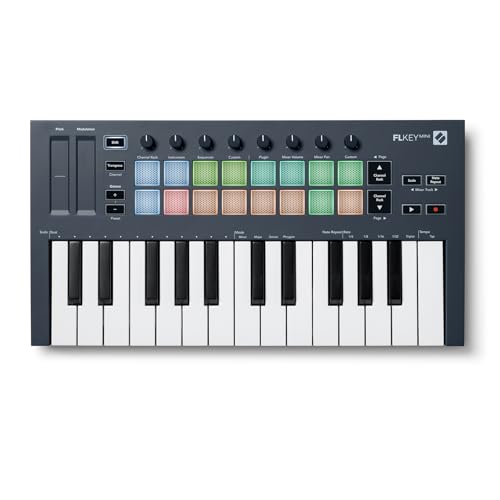
FL Studio has one of the largest user bases of any DAW in the world — and for those users, Novation has built something truly special. The Novation FLkey Mini integrates directly with FL Studio’s Step Sequencer, Channel Rack, and Mixer without any setup or mapping required. The 16 pads map directly to the step sequencer for fast beat programming, while the eight knobs control FL Studio’s volume and pan parameters in real time. Scale mode keeps you in the right key, and Fixed Chord mode lets you play full chords from a single key — both features accessed natively through FL Studio.
It ships with a six-month trial of FL Studio Producer Edition — a genuinely generous bundle that gives you full access to the DAW while you decide whether to purchase. For the FL Studio producer who wants a controller built specifically for their workflow, there’s no competition. The larger FLkey 37 and FLkey 49 are also available if you need more keys. See our guide to audio interfaces for FL Studio to complete your setup.
Pros:
- Native FL Studio integration: Step Sequencer, Channel Rack, and Mixer control with zero setup.
- 6-month FL Studio Pro trial: An outstanding software inclusion that saves you hundreds of dollars.
- Compact and affordable: Under $100 for a deeply integrated, purpose-built controller.
Cons:
- FL Studio-specific: The deep integration benefits don’t carry over when switching DAWs.
- Mini keys only: The 25-key mini format is limiting for melodic playing.
6. Arturia MiniLab 3 — Best Premium Mini Keyboard

| Feature | Details |
|---|---|
| Keys | 25 slim velocity-sensitive |
| Pads | 16 (2 banks × 8) RGB backlit |
| Controls | 8 encoders, 4 faders, mini display, USB-C, MIDI Out |
| Price | Approximately $99 |
Arturia’s third-generation MiniLab is the most refined compact controller we’ve tested. The MiniLab 3 stands apart from its competition through three things: build quality, software, and sustainability. The chassis uses at least 50% recycled materials and carries a 5-year warranty — unheard of at this price point. Two touch strips for pitch and modulation replace standard wheels, giving it a modern, minimal aesthetic. The mini display and clickable browsing knob let you navigate the included Analog Lab V preset library (thousands of sounds) without touching a mouse.
The software bundle is outstanding for the price: Analog Lab V, Ableton Live Lite, UVI Grand Piano Model D, and NI The Gentleman, plus 2 months of Loopcloud. It integrates with Ableton Live, Logic Pro, Reason, Bitwig, and FL Studio. The MiniLab 3 is also available in a wide variety of colourways including Deep Black, Black/Orange, Champagne, and a limited-edition Mint Green.
Pros:
- 5-year warranty: Extraordinary longevity guarantee backed by an eco-conscious build.
- Best software bundle at this price: Analog Lab V alone is worth significantly more than the controller’s cost.
- Mini OLED display: Browse 500+ presets directly from the controller.
Cons:
- Touch strips vs. wheels: Some players prefer traditional pitch and mod wheels for tactile feedback.
- Slim keys: The narrow key profile takes adjustment for players accustomed to full-size keys.
7. Native Instruments Komplete Kontrol S88 MK3 — Best 88-Key Controller

| Feature | Details |
|---|---|
| Keys | 88 fully-weighted hammer action (Fatar keybed) |
| Special Feature | Polyphonic aftertouch + weighted keys (world-first) |
| Display | High-resolution colour screen (1280×480) |
| Connectivity | USB-C, 5-pin MIDI I/O, MIDI 2.0 compatible |
| Price | Approximately $999 |
The Native Instruments Komplete Kontrol S88 MK3 is the most technically advanced 88-key MIDI controller available to consumers today, and it holds several distinctions worth knowing. It is the world’s first widely available controller keyboard to combine polyphonic aftertouch with a fully weighted, hammer-action keybed — meaning you can apply individual pressure to each key independently for per-note expression, something previously only possible on lighter-action controllers. The Fatar keybed (the same manufacturer used in Kawai and Studiologic instruments) is genuinely exceptional, with a piano feel that serious composers will appreciate.
The high-resolution colour screen (1,280 × 480 pixels) shows plugin parameters, waveforms, and preset information directly on the controller, eliminating the need to look at your computer screen during performance. NKS integration brings automatic parameter mapping for thousands of third-party instruments, while deep DAW integration covers Ableton Live, Logic Pro, Cubase, FL Studio, Pro Tools, and more. MIDI 2.0 compatibility makes this a future-proof investment. It ships with Komplete 15 Select — a substantial sound library — as well as Ableton Live Lite.
Pros:
- Polyphonic aftertouch + hammer action: The most expressive 88-key controller available.
- High-res colour display: Real-time plugin parameter display changes how you interact with software.
- MIDI 2.0 ready: Future-proof connectivity standard.
Cons:
- Price: At ~$999, it requires serious investment — this is a professional-grade tool.
- NI-ecosystem dependent: Third-party plugin integration requires NKS packs for full mapping.
8. Arturia KeyLab Essential 61 — Best for Studio Production

| Feature | Details |
|---|---|
| Keys | 61 velocity-sensitive |
| Pads | 8 RGB backlit |
| Faders | 9 |
| Price | Approximately $299 |
The Arturia KeyLab Essential 61 is one of the most complete studio controllers available at its price point. Nine faders, eight pads, eight encoders, and deep DAW integration make it a versatile production hub that doesn’t compromise on playability. The included Analog Lab software provides access to over 6,000 sounds from Arturia’s legendary synth collection, covering everything from classic analogue emulations to acoustic instruments. It works natively with Ableton, Logic, Pro Tools, Cubase, and FL Studio, with transport, mixer, and device controls pre-mapped out of the box.
Pros:
- Comprehensive control surface: Nine faders make mixer and parameter control feel natural.
- Analog Lab software: Access to 6,000+ premium sounds included in the box.
- Universal DAW integration: Works across all major production environments.
Cons:
- Bulky for small desks: 61 keys plus extensive controls take up significant desk real estate.
- Price step up: At $299, it costs more than most other options in this guide.
9. M-Audio Keystation 88 MK3 — Best Simple 88-Key Controller

| Feature | Details |
|---|---|
| Keys | 88 full-size semi-weighted |
| Connectivity | USB, 5-pin MIDI Out |
| Price | Approximately $199 |
For pianists who simply want 88 full-size keys without the complexity of a dedicated production surface, the M-Audio Keystation 88 MK3 is a clean, affordable solution. It’s plug-and-play on Mac and Windows, the semi-weighted keys have a satisfying spring-assisted action, and the pitch and modulation wheels are positioned comfortably. Octave shift, data entry dial, and sustain pedal input cover the essentials. This isn’t a production controller — it’s a playing controller, designed for triggering virtual instruments and piano VSTs in your DAW.
Pros:
- 88 full-size semi-weighted keys at an accessible price: Outstanding value for the full keyboard range.
- Plug-and-play simplicity: No drivers, no setup — just connect and play.
Cons:
- No pads, minimal controls: Not suited for beat-making or hands-on DAW control.
- Semi-weighted action: Lighter than the weighted action pianists trained on acoustic instruments prefer.
10. Kawai VPC1 — Best Grand Piano Action

| Feature | Details |
|---|---|
| Keys | 88 wooden grand feel (Kawai RM3 II keybed) |
| Connectivity | USB, 5-pin MIDI |
| Price | Approximately $2,499 |
For concert pianists and serious performers who will not compromise on keybed authenticity, the Kawai VPC1 is the ultimate MIDI controller. Kawai’s RM3 II Grand Feel keybed uses genuine wooden keys and accurately graduated weighting (heavier in the low register, lighter in the high register) — precisely replicating the response of a concert grand acoustic piano. The triple sensor mechanism allows you to repeat notes faster than any other controller in this list. This is what professional piano-focused composers use when triggering premium piano sample libraries such as Garritan, Vienna Symphonic Library, or Synthogy Ivory.
Pros:
- Authentic grand piano touch: Wooden keys with graduated weighting — the closest you can get to the real thing.
- Triple-sensor mechanism: Allows ultra-fast note repetition, essential for classical technique.
Cons:
- High price point: At ~$2,499, this is a major investment suited to serious pianists only.
- No onboard sounds or production controls: Pure MIDI controller — you need software and an audio interface to produce sound.
How to Choose the Right MIDI Keyboard — Definitive Buying Guide
What is a MIDI Keyboard Controller?
MIDI stands for Musical Instrument Digital Interface. A MIDI keyboard controller does not produce sound on its own — it sends MIDI data (note information, velocity, control messages) to your computer or hardware synthesizer, which generates the actual audio. This means you are never locked into a single sound source; one controller can trigger piano, strings, drums, synths, or any instrument in your studio setup. Think of it as a universal remote for your entire sound library.
How Many Keys Do I Need? (25 vs. 37 vs. 49 vs. 61 vs. 88)
The number of keys is the first and most important decision you’ll make. Here’s a practical breakdown: 25 or 37 keys are ideal for producers who primarily program beats and basslines one-handed, or anyone working in a cramped space or on the go. You can access additional octaves with shift buttons. 49 keys is the sweet spot for most producers — it accommodates two-handed playing across a usable range while maintaining a compact desktop footprint. 61 keys covers four octaves and is the minimum recommended for comfortable two-handed piano performance and orchestral composition. 88 keys is the standard for pianists who need the full concert range and want muscle memory to transfer directly from an acoustic instrument.
If your budget allows, always err toward more keys rather than fewer. The limitation of too few keys becomes frustrating much sooner than you’d expect.
Key Actions Explained: Synth, Semi-Weighted, and Hammer Action
Synth action (unweighted) keys use springs to push back against your fingers, requiring minimal pressure to trigger. They’re fast, light, and common on compact controllers and budget keyboards. Great for synth leads, organ playing, and fast passages where you want minimal resistance. Semi-weighted keys add a small amount of internal resistance for a more substantial, controlled feel without the full weight of a piano action. Most mid-range controllers in this guide use semi-weighted keys, and they represent the best balance for producers who split their time between playing and programming. Hammer action (weighted) keys use actual hammers or mechanical weights to simulate the response of an acoustic piano, where lower notes require more force than higher ones. They’re heavier, more expensive, and essential for pianists who want their technique to transfer authentically between acoustic and digital instruments.
Aftertouch and MPE (MIDI Polyphonic Expression)
Aftertouch is a MIDI feature that sends a continuous control signal when you press down on a key after it has triggered a note — pushing through the initial velocity. Channel aftertouch applies the same message to all notes playing simultaneously. Polyphonic aftertouch (found on the NI S88 MK3 and Launchkey MK4 pads) sends an independent message per key or pad, allowing you to modulate each note differently within a chord — adding vibrato to one note while holding another steady, for example.
MPE (MIDI Polyphonic Expression) is the next evolution of this concept. MPE is a specification that allows controllers to send continuous pitch, pressure, and slide data for each note independently, enabling a level of expressiveness that was previously only possible on instruments like the guitar or violin. MPE-compatible plugins and DAWs (Ableton Live 11+, Logic Pro 10.5+, Bitwig Studio) can respond to these multidimensional messages. If expressive performance is important to your work, look for MPE-compatible controllers as your budget grows.
Connectivity: USB-C, 5-Pin MIDI, and CV/Gate
Most modern controllers connect to your computer via USB, which handles both power and MIDI data in a single cable. USB-C is the current standard — faster, reversible, and compatible with modern laptops without adapters. Look for USB-C on any controller purchased in 2026. 5-pin DIN MIDI (the traditional round connector) allows you to connect your controller directly to hardware synthesizers, drum machines, and other MIDI gear without a computer in the chain — essential for live hardware rigs. CV/Gate (Control Voltage / Gate) outputs are for connecting to analog synthesizers and Eurorack modular systems that predate MIDI. Only specialist controllers like the Arturia KeyStep Pro include CV/Gate, but they’re irreplaceable if you work with modular gear. For a complete recording chain, pair your MIDI keyboard with one of our recommended audio interfaces.
Performance Pads
Most controllers in this guide include velocity-sensitive pads for triggering drum sounds, launching clips in Ableton Live, or playing chromatic instruments with your fingers. Pad counts range from 8 to 16, and quality varies significantly. Look for pads that respond to both velocity (how hard you hit) and pressure aftertouch for maximum expressiveness. The Novation Launchkey 61 MK4’s FSR (Force Sensing Resistor) pads with polyphonic aftertouch are currently the benchmark at this price level.
How We Test MIDI Keyboards at Studio Gear Experts
Every controller reviewed in this guide was evaluated using a consistent hands-on testing methodology across a real home studio environment. We assess build quality and key feel through extended playing sessions across multiple genres — including fast passages that expose tracking latency, and slow, expressive playing that reveals velocity sensitivity. Pad sensitivity is tested using both finger-drumming at tempo and light touch triggering to find the threshold for minimum velocity. DAW setup ease is evaluated by connecting each controller to Ableton Live, Logic Pro, and FL Studio and measuring how many steps it takes to be fully operational. Software bundle value is assessed by installing and using every included application, rather than simply listing it. Finally, build longevity is considered through research into long-term owner reports and warranty terms. We only recommend controllers we would use ourselves.
Frequently Asked Questions
Do I need a MIDI keyboard to produce music?
No — you can draw MIDI notes into your DAW’s piano roll using a mouse, and many professional producers work entirely this way. However, a MIDI keyboard significantly speeds up the workflow of capturing melodic and harmonic ideas in real time, and the physical act of playing tends to produce more musical, expressive results than clicking notes in a grid. Even an inexpensive controller like the Nektar SE49 can transform how quickly you move from idea to finished phrase. For most producers, a keyboard is the single piece of gear that delivers the biggest jump in creative output per dollar spent.
Do MIDI keyboards make their own sound?
No. Standard MIDI keyboard controllers do not generate audio on their own. They transmit MIDI data — essentially instructions about which note to play, how hard it was hit, and how long it was held — to a connected computer or hardware synthesizer, which then generates the actual sound. The Yamaha MX88 is an exception: it is a hybrid controller that includes onboard synthesizer sounds and can function as a standalone instrument without a computer. Everything else on this list requires either a computer running a DAW and virtual instruments, or an external hardware synthesizer, to produce audio.
What is the best MIDI keyboard size for a small desk?
For most small desks (less than 100cm / 40 inches wide), a 25-key or 49-key controller is the practical choice. The Arturia MiniLab 3 (25 keys) and Novation FLkey Mini (25 keys) are specifically designed to share space with a laptop, monitor, and audio interface without crowding. If you need more playable range but can’t fit a full 61-key unit, the Nektar SE49 (49 keys) has a surprisingly compact footprint for a full-size keybed. Our guide to recording studio equipment can help you plan a complete, space-efficient setup.
What is the best MIDI keyboard for Ableton Live?
The Novation Launchkey 61 MK4 is our top recommendation for Ableton Live users. It offers clip launching, transport control, device navigation, and mixer control — all without any manual mapping. Novation has maintained a close partnership with Ableton for over a decade, and the integration quality shows. For a more compact Ableton-focused option, the Launchkey 25 or Launchkey 37 MK4 offer the same integration in a smaller form factor. Check out our guide to the best DAWs for more on Ableton Live’s full capabilities.
What is the best MIDI keyboard for FL Studio?
The Novation FLkey Mini (compact option) or Novation FLkey 37/49 (for more keys) are purpose-built for FL Studio. They map directly to FL Studio’s Step Sequencer, Channel Rack, Mixer, and plugin controls without any setup. No other controller offers this depth of FL Studio-native integration at this price point.
Final Thoughts & Top 3 Recommendations
After extensive testing across all price ranges, three controllers emerge as our absolute top picks depending on your situation. For most producers — regardless of DAW — the Novation Launchkey 61 MK4 is the right choice at ~$249. The semi-weighted keys, polyphonic aftertouch pads, 9 faders, and universal DAW integration make it the best all-around controller we’ve ever tested at this price. For budget-conscious beginners or mobile producers, the Akai MPK Mini IV at ~$119 is the most capable compact controller available, now with USB-C, real pitch and mod wheels, and a 1,000-sound bundle. For pianists and composers who refuse to compromise on key feel, the NI Komplete Kontrol S88 MK3 at ~$999 is the most expressive and technologically advanced 88-key controller on the market today — a serious investment that will serve you for a decade.
Whatever controller you choose, the most important thing is to start playing and building your workflow. Even the most basic MIDI keyboard opens up a world of musical possibility that a mouse alone simply cannot replicate. If you’re setting up a full studio from scratch, make sure to explore our complete recording studio equipment checklist and our guide to the best DAW software for music production.
