For years, spatializing your mix inside a DAW meant juggling multiple plugins, bouncing between windows, or shelling out serious cash for tools built for Dolby Atmos post-production — not bedroom producers or home studio builders. The market was missing a single, affordable tool that worked like a real acoustic environment right inside your session. That gap just got closed. Audiocube Space has arrived, and my immediate verdict: this is the most accessible and genuinely exciting 3D audio plugin to land in 2026. At $50, it punches so far above its weight it’s almost unfair.
What Exactly Is Audiocube Space?
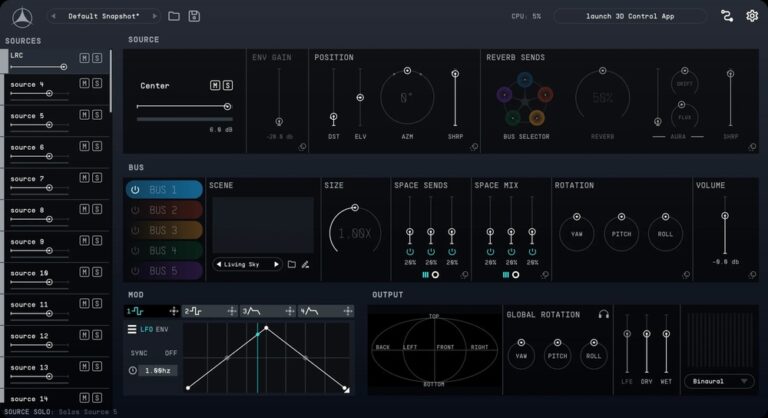
Think of it as turning your DAW into a physically modeled 3D acoustic room. You drop the plugin onto any track, open a 3D viewport, and drag your sound anywhere you want it — left, right, above, below, behind the listener. It works in Ableton, Logic, Pro Tools, FL Studio, Reaper, and any other VST3/AU/AAX-compatible host on both Mac and Windows.
This isn’t a reverb plugin with a fancy UI. The acoustic simulation is driven by Audiocube’s own Ripple Engine — modeling distance rolloff, air absorption, occlusion, and source directivity in real time. That’s the kind of physics that used to live in $600 plugins or dedicated spatial DAWs.
The Spec Breakdown
| Feature | Detail |
|---|---|
| Format | VST3, AU, AAX |
| Platform | macOS & Windows |
| Output | Stereo, Binaural HRTF, up to 9.1.6 + custom arrays |
| Reverb Engine | 10 room shapes, 11 surface materials + IR convolution import |
| 3D Positioning | Full X/Y/Z axis, Radar Joystick + viewport |
| Motion | BPM-synced patterns + manual DAW automation |
| Granulator | Up to 50 pitch-shifted grains, 14 musical scales |
| Multi-instance Linking | Yes — control all tracks from one window |
| Licenses | 1 license, 3 machines, all future updates included |
| Price | $50 intro (rising to $79.99) |
What the Press Release Isn’t Telling You
Here’s the thing the marketing language glosses over: CPU load is a genuine unknown. Community forums are already raising the question — and it’s a fair one. If you’re running 20+ instances in a dense mix, the Ripple Engine’s physics simulation could choke a mid-range laptop. Audiocube hasn’t published benchmark data yet, and that silence is notable.
The free trial is available, which is a green flag — they’re confident enough to let you stress-test it before buying. Do that. Open a busy session, load up four or five instances, and watch your CPU meter before committing.
“The most seamless option wasn’t to build a bridge, but to rebuild the core Audiocube engine as an independent plugin.”
— Noah Feasey-Kemp, Audiocube Developer
How It Stacks Up Against the Competition
vs. dearVR Pro ($199+)
dearVR Pro is the current market leader in DAW-based spatial audio. If you already own it, Audiocube Space won’t replace it for pure binaural precision or Dolby Atmos post-production work. But if you’ve been eyeing dearVR and baulked at the price, Space gives you a legitimate alternative at a fraction of the cost — with a generative granulator that dearVR simply doesn’t have.
vs. Your Stock DAW Panner
If you’re still panning tracks left and right and calling it a mix, this is absolutely the upgrade you’ve been waiting for. The difference between a flat stereo pan and a physically modeled 3D placement — with distance attenuation, room reflections, and real head-tracking binaural output — is not subtle. Your studio monitors and headphone mixes will both immediately benefit.
Who Should Actually Buy This?
✅ Buy This If…
- You’re a bedroom producer mixing for streaming and want your music to sound wider and more immersive
- You make ambient, experimental, or cinematic music and want evolving spatial textures without a complex post-production setup
- You’re a content creator or podcaster who wants spatial audio for YouTube or spatial binaural headphone experiences
- You’re on a budget — $50 for everything this offers is genuinely exceptional value, especially at the intro price
- You want to work across 3 machines (studio desktop, laptop, home rig) with one license
❌ Skip This If…
- You already own dearVR Pro and use it daily for commercial Dolby Atmos work — the workflow benefit doesn’t justify a second tool yet
- Your CPU is already maxed out on plugins — stress-test the trial first
- You need a certified Dolby Atmos deliverable — Space isn’t marketed for that workflow
- You only mix in pure stereo for vinyl or standard CD — spatial tools won’t help if the format doesn’t support it
The Granulator Is the Hidden Weapon
Most of the conversation around Audiocube Space focuses on the 3D positioning. Fair enough — that’s the headline feature. But the integrated spatial granulator deserves its own moment.
You can scatter up to 50 individual pitch-shifted delay grains into a cloud around your sound source in 3D space. Lock those grains to one of 14 musical scales, and you get a harmonically tuned ambient texture that breathes and moves automatically. That’s the kind of generative tool that would cost separately as its own plugin. Here it’s baked in.
For producers building soundscapes for headphone listening, this alone makes Space worth investigating.
Quick Setup: How It Works in Your DAW
The workflow is refreshingly simple for how much it does:
- Insert Space as an effect on any track in your DAW — just like you’d load a reverb or EQ.
- Open the 3D viewport and drag your source to where you want it in the room.
- Shape the acoustic space using the room modeling controls (10 room types, 11 surface materials).
- Add motion automation — either BPM-synced presets or manual DAW automation curves.
- Fire up the granulator if you want evolving harmonic texture in the space.
- Set your output: binaural for headphones, stereo for studio monitors, or multi-channel for the full setup.
The multi-instance linking is particularly clever. Drop Space on five different tracks, link the instances, and adjust the listener position across all of them from a single plugin window. That’s a workflow detail that shows real thought went into how producers actually mix.
The Bottom Line on Audiocube Space
Audiocube Space is the most complete entry point into 3D audio production that’s ever been available at this price. The Ripple Engine delivers acoustic simulation that rivals tools costing four times as much. The granulator adds a genuinely creative layer that sets it apart from every spatializer in this price range. The only real question mark is CPU performance under heavy load — and that’s exactly why the free trial exists. Download it, beat it up, and decide for yourself. At $50 right now, the risk of trying it is basically zero.
Does Audiocube Space look like a game-changer to you, or does something about it give you pause? Have you tested it yet? Drop your thoughts in the comments — especially if you’ve compared it head-to-head with dearVR or another spatializer. We’d love to hear what you find.
→ Learn more and download the free trial at the official Audiocube Space product page.