Getting vocals to sit perfectly in a mix has always been a grind. Hours of automation, stacked plugins, reverb throws timed by hand — the work never ends. That changes with iZotope Nectar 5. This isn’t a minor update. It’s a full rethink of what AI-powered vocal production can actually do, and it’s one of the most genuinely exciting plugin releases of the year. Verdict up front: if vocals are part of your workflow, this deserves your serious attention.
What’s New in Nectar 5
iZotope didn’t just add a couple of modules and call it a day. Nectar 5 ships with two brand-new processing tools, a rebuilt Vocal Assistant, and something genuinely unprecedented in the plugin world.
| Feature | What It Does |
|---|---|
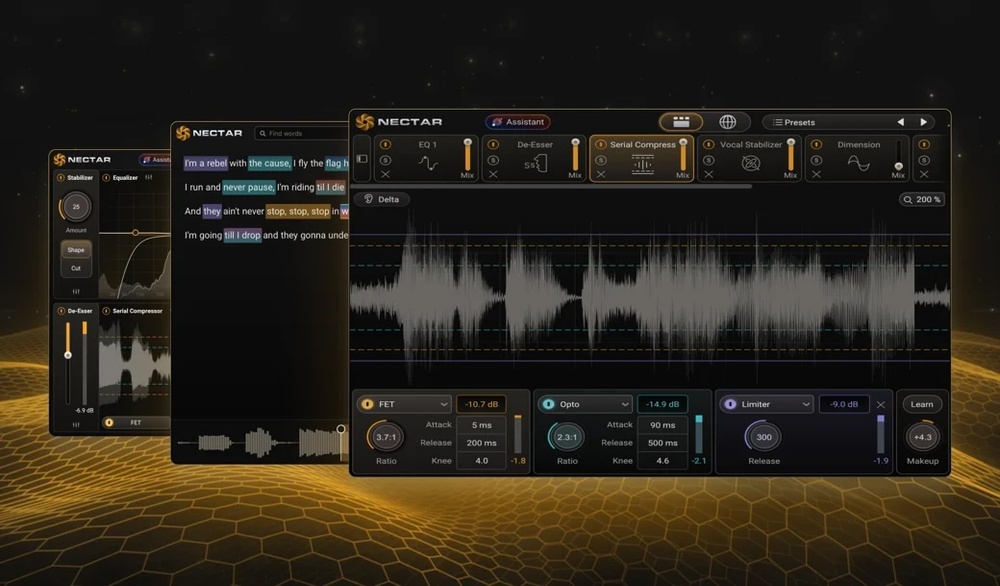
| Moments (ARA plugin) | Transcribes your vocal and lets you apply effects to individual words — reverb, delay, doubling, pitch shifts, and more |
| Serial Compressor | Stacks up to 3 compressors, limiters, or clippers in series with auto makeup gain |
| Vocal Stabilizer | An adaptive EQ that continuously shapes the tonal balance of your vocal as it moves |
| Custom Flow (Vocal Assistant) | Tell the AI your style, key, register, and atmosphere — or drop in an a cappella reference — to dial in a starting chain instantly |
| Overview Page | All core module controls in one place for fast adjustments without diving into individual plugins |
| 18 total plugins | Full suite including Breath Control, Melodyne essential, and 14 component plugins |
The Feature iZotope Isn’t Fully Talking About
Moments is the headline, and rightly so. Applying effects word-by-word without drawing a single automation lane is genuinely new territory. But the press materials quietly gloss over a few things worth knowing.
Moments requires ARA support. That means Logic Pro, Studio One, Cubase, and a handful of others. If you’re on FL Studio or an older version of Pro Tools, Moments doesn’t work in that mode. It’s a big asterisk that buries itself in the fine print. Worth checking your DAW before you buy.
Also missing from the marketing: any honest discussion of the CPU hit. With 18 plugins, a Serial Compressor chain running three stages, and real-time transcription through Moments — your machine will feel it. If you’re mixing on a low-spec laptop, test the trial carefully before committing.
How Does It Stack Up?
The closest competitor is Waves Vocal Rider + their vocal chain bundles, which you’re probably already using. Nectar 5 isn’t just catching up — it leapfrogs them on AI features and workflow speed.
If you already own iZotope’s Music Production Suite, Nectar 5 is a logical upgrade rather than a revelation. But if you’re still building vocal chains manually from individual EQ, compression, and de-essing plugins — piece by piece, session by session — this is exactly the upgrade you’ve been waiting for. The Vocal Assistant alone saves 20 minutes of setup on every session. That’s real time back in your day. And if you’re recording with a solid mic but need help getting it to sit right in the mix, check out our guide to the best vocal microphones under $200 as your starting point before you even open a plugin.
Who Should Actually Buy This?
✅ Buy This If You Are…
- A bedroom producer who wants professional vocal results without a 10-plugin chain
- A singer-songwriter self-producing — the Vocal Assistant is your engineer in a box
- A content creator who needs spoken or sung vocals to cut cleanly in a mix
- A home studio builder using a DAW that supports ARA (Logic, Studio One, Cubase, Reaper)
- Someone who updated from Nectar 1–3 and skipped version 4
⛔ Skip This If You…
- Already own Nectar 4 and don’t need Moments (the update from N4 is $89 — still worth checking)
- Use FL Studio or any other non-ARA DAW as your primary host (Moments won’t run)
- Mix on a low-spec machine without headroom to spare
- Primarily work with instruments only — this is a vocal-specific suite
Pricing Breakdown
iZotope has priced Nectar 5 with a range of entry points depending on where you’re coming from. Here’s the full picture at a glance.
| Edition / Path | Price (USD) |
|---|---|
| Nectar 5 (full) | $179 |
| EDU pricing | $124.50 |
| Crossgrade from any paid iZotope product | $149 |
| Update from Nectar 4 | $89 |
| Update from Nectar 1–3 | $109 |
| Upgrade from Nectar Elements | $139 |
| Nectar 5 Elements (entry level) | $39 |
The Elements tier gives you the Vocal Assistant, Custom Flow, and the Overview page — all the AI horsepower — without the Moments plugin or the full 18-plugin suite. It’s a smart entry point for anyone just starting to build a home studio. Speaking of which, you’ll want a solid audio interface to get the best signal into Nectar in the first place. And if you’re still choosing your recording environment, our recording studio equipment checklist covers everything you need to get set up properly.
The Real-World Wins
The Vocal Stabilizer is quietly one of the best additions here. It’s essentially the adaptive EQ from iZotope’s mastering suite Ozone, applied to vocals — meaning it chases the tonal character of the performance and corrects for shifts without you touching a knob. That’s the kind of “set it and trust it” tool that makes the difference on dense mixes.
The Serial Compressor is equally impressive. Stack a smooth optical-style compressor for body, hit a clipper for transient control, and add a limiter to catch peaks — all in one module with automatic gain compensation between stages. That would take three separate plugins and careful gain-staging to replicate manually. Understanding how compression actually works will help you get even more from this module once you have it in your hands.
iZotope Nectar 5 is the most complete all-in-one vocal production suite on the market right now. The Moments plugin alone is worth the conversation — no other tool lets you apply reverb to a single word without automation, and that’s not a small thing. If vocals are in your session, iZotope Nectar 5 earns its place in your plugin folder. The question isn’t whether it’s worth the price. The question is which tier fits where you are right now.
Does iZotope Nectar 5 look like a winner to you, or is there a feature you’re still not sold on? Drop your thoughts in the comments below — especially if you’ve already tried the trial.