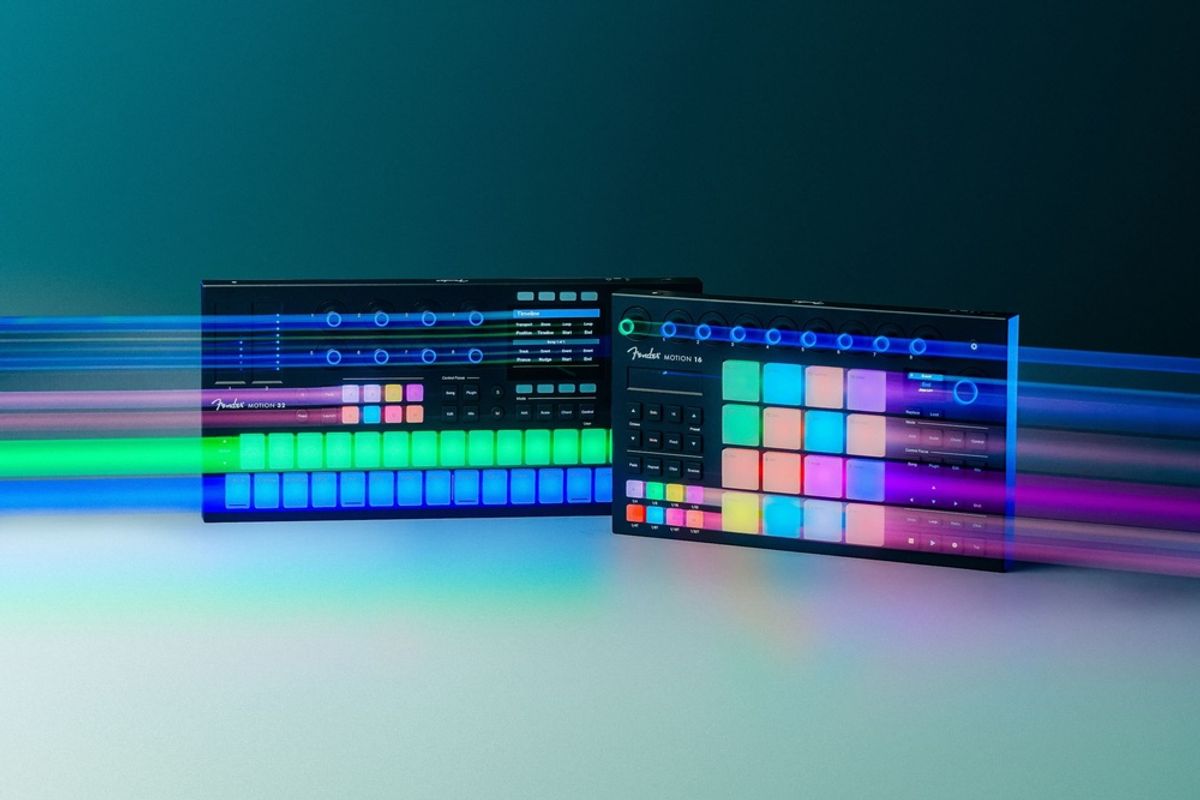
For years, pad controllers have been stuck in a rut. You either paid premium prices for mediocre pads, or you got great pads with software integration that felt like an afterthought. Fender’s New Motion Controllers — the Motion 16 and Motion 32 — just landed, and the verdict? This is the most compelling pad controller entry in years. Fender didn’t just rebrand old PreSonus hardware. They built something genuinely new.
What’s Actually Inside the Box
Here’s the quick breakdown — no fluff, just what matters.
| Feature | Motion 16 | Motion 32 |
|---|---|---|
| Pads | 16 RGB FATAR pads (4×4) | 32 RGB FATAR pads (8×4) |
| Aftertouch | Polyphonic | Polyphonic |
| Touch Strips | 1 (pitch/mod) | 2 (dedicated pitch + mod) |
| Encoders | 9 illuminated touch encoders | 8 illuminated touch encoders |
| Display | Color display | Larger color display |
| Chord Progressions | 30+ built-in | 30+ built-in |
| DAW Integration | Fender Studio Pro + any DAW | Fender Studio Pro + any DAW |
| Price | $269.99 | $329.99 |
Both come bundled with a perpetual license for Fender Studio Pro — a $199.99 value on its own. That’s a significant detail hiding in plain sight.
The FATAR Factor — Why This Actually Matters
The pads on most controllers feel like tapping a dinner plate. That’s where the Motion line pulls ahead. Fender partnered with FATAR — the Italian company that has been building the key actions inside premium keyboards and digital pianos since 1956 — to design the pads from scratch. This marks FATAR’s first-ever foray into pad design, and the result is polyphonic aftertouch: press harder on an individual pad after the initial hit, and it sends additional expressive data independently per note.
This isn’t the same as standard aftertouch, which just reacts to general pressure across all notes at once. Polyphonic aftertouch means two notes playing simultaneously can have completely different expressive responses. Vibrato on one note. A filter sweep on another. It’s real performance expression, not a checkbox feature.
“The Motion controllers feel like a direct line between what I’m thinking and Fender Studio Pro.” — Yaahn Hunter Jr.
What the Press Release Isn’t Telling You
Let’s be honest about a few things. The deep integration with Fender Studio Pro is genuinely impressive — one-tap track creation, timeline navigation without ever touching your mouse, instant instrument loading. But that integration is exclusive to Studio Pro. If you’re an Ableton Live or Logic Pro die-hard, you lose most of those smart features and get a capable-but-basic MIDI controller instead.
The Motion 32 also loses the color display of the Motion 16 in exchange for the wider 8×4 pad layout. That’s a real trade-off, not a typo. And neither controller addresses hardware MIDI DIN connectivity — it’s USB-only. For a purely laptop-based setup, that’s fine. For anyone with a hardware synthesizer or drum machine at the center of their rig, that’s a gap worth noting before you buy.
The smart scale and 30+ built-in chord progressions are genuinely useful for songwriting. But they’re not entirely new concepts — Ableton Push and the Arturia BeatStep Pro offer similar musical intelligence. What Fender does differently is wrap everything inside a more approachable, instrument-first design philosophy. Whether that philosophy justifies the price depends entirely on your setup.
How It Stacks Up Against the Competition
If you already own an Ableton Push 3, the Motion 16 or 32 won’t change your life. The Push 3 is a more complete standalone instrument, and at its price point it should be. But if you’re still on a PreSonus Atom SQ — which the Motion controllers directly replace — this is a meaningful upgrade in pad quality, expressiveness, and workflow integration. The FATAR pads alone are a generational jump over the Atom’s feel.
For producers comparing against something like the Akai MPC One+, it comes down to priorities: the MPC is a standalone instrument with its own brain. The Fender Motion needs a computer. Different tools, different philosophies. Understanding how to pick the right MIDI controller for your workflow is half the battle before you spend a dollar.
Who Should Actually Buy This?
✅ Buy This If…
- You use Fender Studio Pro as your main DAW — or you’re open to switching
- You’ve been frustrated by rubber pads that don’t respond to light touches
- You want built-in songwriting tools to break through creative blocks
- You need an upgrade path from the PreSonus Atom or Atom SQ
- You want a bundled DAW license and solid hardware in one package
❌ Skip This If…
- You’re locked into Ableton Live or Logic Pro and don’t want to switch
- You need hardware MIDI DIN output for a synth-heavy rig
- You already own an Ableton Push 3 or similar premium controller
- You primarily record live instruments and rarely sequence with pads
- Budget is the #1 priority — the entry-level controller market has solid options under $100
Setting Up Your Studio Around It
A great controller is only as powerful as the setup around it. Pair either Motion model with a clean home studio signal chain — a solid audio interface, a decent set of monitors — and the expressiveness of those FATAR pads will translate directly into your recordings. Skip one of those links and you won’t hear the difference you paid for. If you’re still building your foundation, understanding which DAW fits your style should come before any hardware purchase.
Bottom line: Fender’s New Motion Controllers represent the most expressive, well-designed pad controllers in this price range — provided you’re willing to lean into the Fender Studio Pro ecosystem. The FATAR pads with polyphonic aftertouch are genuinely special, the bundled DAW license is a real value-add, and the songwriting tools are legitimately useful rather than marketing window dressing. Whether that package fits your studio depends entirely on the software already sitting at the center of your setup.
Does Fender’s play into the controller market impress you, or does locking the best features behind one DAW feel like a dealbreaker? Drop your take in the comments — and if you’ve already got your hands on one, we’d love to hear how those FATAR pads actually feel in a real session.
🎛️ Learn more and purchase: Fender Motion Controllers — Official Fender Studio Page