Getting a real choir sound in your DAW has always been the hard part. Sample libraries give you something that almost sounds right. Harmony plugins give you pitch — but not presence. The words get mangled. The texture goes flat. And booking actual singers? That’s a budget most bedroom producers will never see. That gap just got a lot smaller. The I Am Choir Plugin from Am I Audio has arrived, and the verdict is simple: this one is genuinely different.
What Makes This Different From Every Other Choir Plugin
Most choir plugins work by triggering samples — you press a key and a pre-recorded syllable plays back. The result can be beautiful, but it’s locked to what was recorded. Your melody doesn’t fit? Too bad.
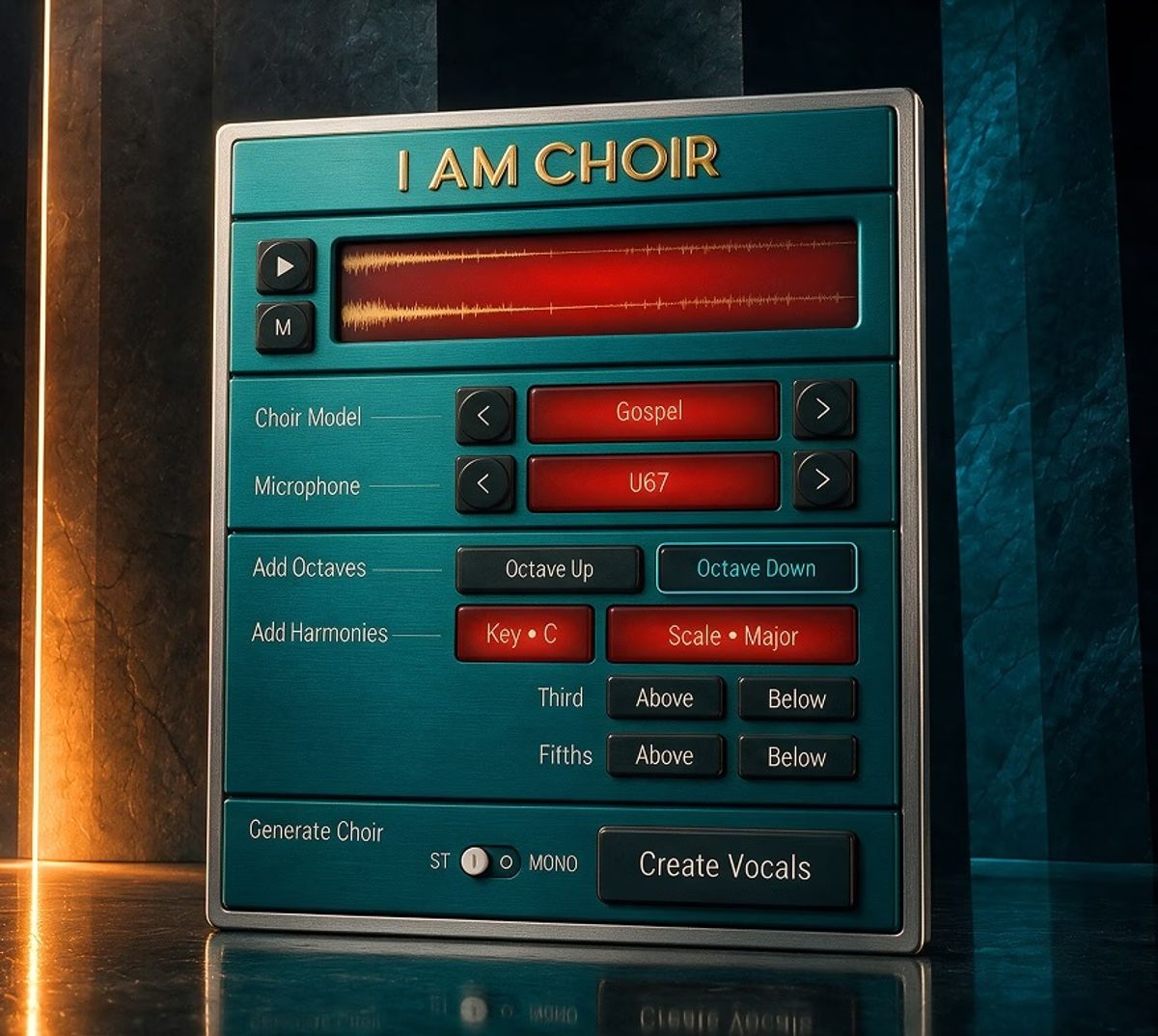
I Am Choir works completely differently. Think of it the way an amp simulator works — you send it a guitar signal and it comes out sounding like a tube amp. Here, you send it a vocal track, and it comes out sounding like a choir. Your words stay your words. Your melody stays your melody. The choir follows you, not the other way around.
The technical term Am I Audio uses is “timbre transfer” — a process developed in collaboration with Tokyo-based music technology experts Neurotone, Inc. All of the processing runs locally on your machine. No cloud subscription, no internet connection required, no audio leaving your studio.
Quick Specs at a Glance
| Feature | Details |
|---|---|
| Developer | Am I Audio (with Neurotone, Inc.) |
| Core Technology | AI timbre transfer — single voice in, choir out |
| Choir Models | Gospel Choir, Kids’ Choir (MUSYCA), Gang Vocals / Shout |
| Harmony Engine | 3rd and 5th above/below with scale and key selection |
| Processing | 100% local — no cloud, no subscription |
| Formats | VST3, AU, AAX |
| Mac Compatibility | macOS 12 or later |
| Windows | In development |
| Intro Price | $169 (regular price $199) — sale ends September 1, 2026 |
Three Choirs, One Plugin
Am I Audio built I Am Choir around three distinct vocal models, each trained with real singers who were compensated up front and will receive royalties going forward. That ethical stance matters — and it’s worth noting because it’s still rare in AI audio tools.
- Gospel Choir — Trained with a Los Angeles gospel choir coordinated by Eric Howard. The warmth and swell you’d expect from a Sunday service, right inside your session.
- Kids’ Choir — Built in partnership with MUSYCA Children’s Choir. Named vocalists. Actual children. The kind of sound that stops a listener cold.
- Shout / Gang Vocals — Trained with producers, songwriters, and artists from Am I Audio’s personal network. Grittier, more energetic, perfect for anthems and drops.
If you’ve ever been in a writing session where someone throws out “what if we had a kids’ choir on the chorus?” — and then everyone laughs because there’s no way to actually try it — that is exactly the moment this plugin was made for. You can demo it on the spot.
What the Press Release Doesn’t Tell You
Let’s be real about the gaps. Windows users are locked out for now. “In development” doesn’t mean “coming next week.” If your whole setup runs on a PC, this isn’t your plugin yet — file it for later and check back.
There’s also the question of source vocal quality. Timbre transfer tools are only as good as what you feed them. If your vocal recording is muddy or recorded in a poor environment, the output will reflect that. Getting this right starts with your recording chain — and that means your microphone matters more than ever when you’re using I Am Choir.
The plugin’s harmony engine — adding thirds and fifths above or below — is useful, but it’s not a full arrangement tool. Don’t expect it to write your choir parts. It follows your lead. You still need to sing something worth following.
How It Stacks Up Against the Competition
The honest comparison point is Spitfire LABS Choir — free, sounds incredible, and trusted by millions. But here’s the key difference: LABS gives you a static, beautiful sound that exists independent of your vocal. I Am Choir wraps around your performance. If you already have LABS and love playing choral pads, this won’t replace that. If you’re a vocalist or songwriter who needs your actual words to come out of a choir, nothing else on the market does that like this.
It’s also worth thinking about how this fits into your broader DAW setup. Because it runs entirely locally, it will use CPU. On an older Mac, stack a few instances and you may notice the strain.
Who Should Actually Buy This?
✅ Buy This If You Are…
- A vocalist or singer-songwriter who wants your lyrics in a real choir texture
- A home producer writing pop, gospel, hip-hop, or film music
- A content creator who needs dramatic, fast choir demos without session singers
- A Mac user on macOS 12 or later with a decent CPU
- Someone who cares about ethical AI and wants to support that model
❌ Skip This If You Are…
- A Windows user (wait for that version to drop)
- A composer who just needs playable choral pads — LABS or Kontakt serve that better
- Working on an older Mac with limited processing headroom
- Looking for a lyric-writing or arrangement tool — this doesn’t write your parts
- On a strict budget with no vocal recordings to feed it yet
Setting Up for the Best Results
This plugin lives or dies on your vocal input. Before you even open it, make sure your recording signal is clean. That starts upstream — with the right audio interface converting your signal accurately and a mic that’s capturing the full texture of your voice without color you don’t want. Once you have a clean track, drop I Am Choir on it, choose your model, dial in the harmony engine to match your key and scale, and let it work.
Producers who focus on getting great vocal recordings first will get the most out of this tool. Think of it as a multiplier — strong input, stunning output. Muddy input, muddy choir.
The Final Word on I Am Choir Plugin from Am I Audio
The I Am Choir Plugin from Am I Audio is the first tool that actually solves the problem — not by replacing your voice, but by multiplying it. At $169 until September 1st, it’s a serious buy for Mac-based vocalists and producers who’ve been waiting for something like this. The Windows wait is a real frustration, and the quality ceiling is still tied to your source recording. But for the right person in the right setup, this is the missing piece. Get your vocal chain solid first, then let I Am Choir take it somewhere a session budget never could.
👉 Check out I Am Choir on the Am I Audio website — introductory price of $169 runs until September 1, 2026.
Does I Am Choir look like a winner to you, or is the Mac-only launch too big a hurdle right now? Drop a comment below and let us know.