Complex sessions have always come with a tax. Scattered plugin windows. Aux tracks built just to route a parallel chain. MIDI mappings you redo from scratch every single project. It’s been the invisible overhead cost of serious production work — until now. Ravine DSP’s Inter::State has arrived, and our take is this: it’s the most practical plugin workflow tool released this year. Not the flashiest. The most useful.
What Is Inter::State, Actually?
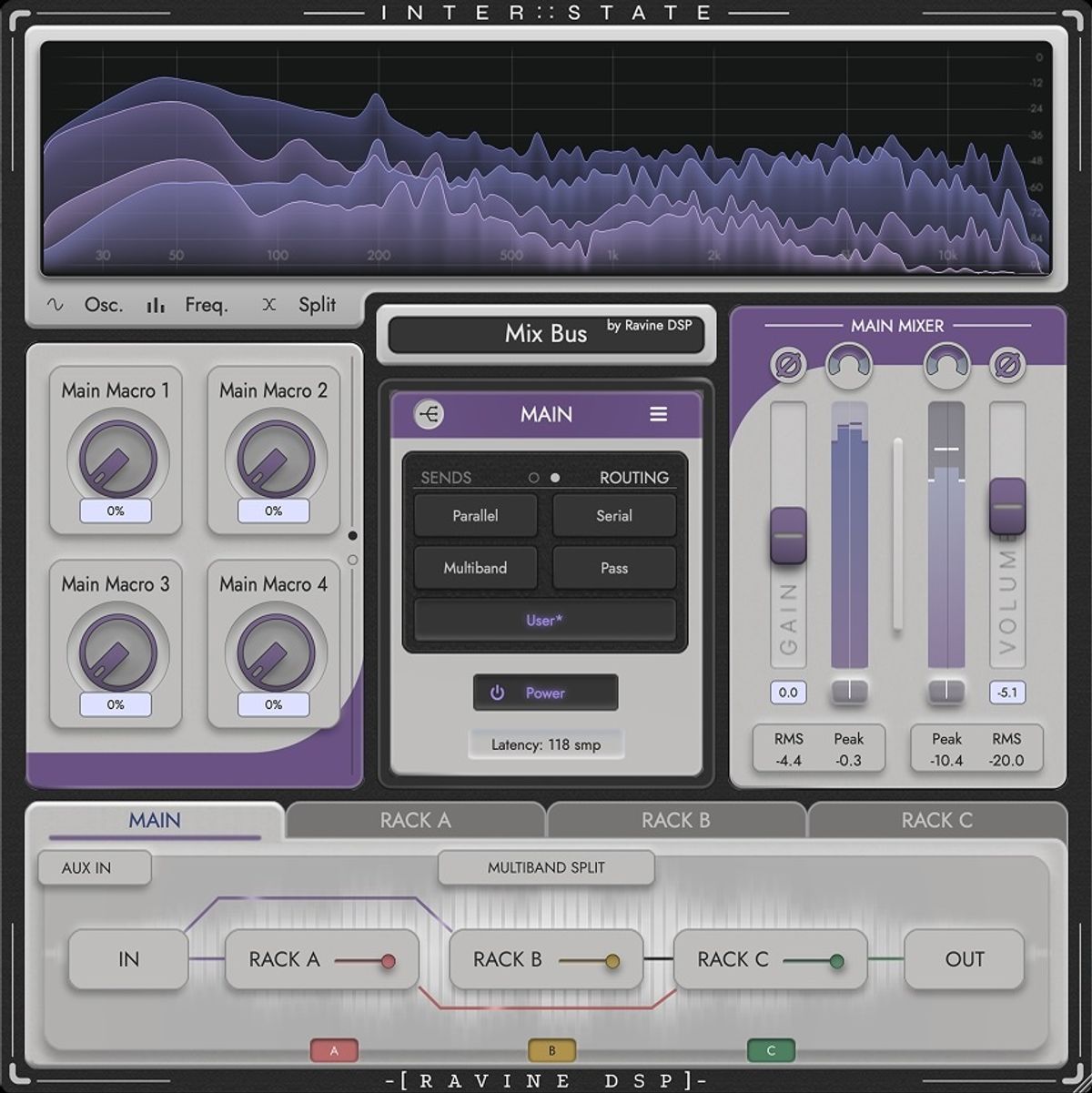
Inter::State is a plugin host — meaning it lives inside your DAW as a single insert effect, and runs your other plugins inside it. Think of it as a smart container for your effects chains. You drop it on a track, load your existing compressors, EQs, and saturators into its three internal racks, and suddenly all of your routing, control mapping, and modulation live in one fixed window.
It supports VST3 and AU formats on Mac and Windows. AAX (Pro Tools) support is still in development — so Pro Tools users will need to wait. That’s the first thing the press release buries that you should know up front.
The Spec Breakdown
| Format | VST3 / AU (AAX coming soon) |
| OS | Windows 10+, macOS 10.13+ |
| Racks | 3 independent racks, 8 slots each |
| Routing | Serial, parallel, multiband, send-style |
| Slot Scenes | 8 parameter states per plugin slot |
| Macros | 8 macros at Main, Rack, and Slot level |
| Oversampling | Up to 16× per slot |
| Included | Inter::State[Bridge] companion at no extra cost |
| Price | $69 (Founders Edition) / $99 regular |
| Trial | 7-day fully functional trial available |
The Feature That Changes Everything: Slot Scenes
Version 1.3 introduced Slot Scenes — and this is where Inter::State gets genuinely exciting. Every plugin slot can now hold eight different parameter configurations. You can snap between them instantly, morph smoothly from one to the next, or trigger tempo-synced transitions.
Picture this: your reverb has a tight room setting for verses, a huge hall for choruses, and a gated ambience for drops — all in the same plugin instance, switched with a MIDI note or a single macro knob. That’s not automation. That’s performance.
What They’re Not Saying
Every tool has a learning curve, and Inter::State is no exception. Setting up macro assignments and modulation routings takes real time upfront. If your sessions are simple — a few plugins in a straight chain — you might spend more time configuring Inter::State than you’d ever save using it.
There’s also the compatibility question. The developer is transparent about this: compatibility depends on the exact combination of your plugins, controllers, and DAW. They offer a 7-day fully functional trial precisely because of this — and that honesty is worth noting. Inter::State does not host instruments, only audio effects. If you were hoping to route synths through it, that’s a firm no for now.
How Does It Stack Up?
The obvious comparison is Blue Cat’s PatchWork, the long-standing go-to for hosting plugins within plugins. PatchWork is solid and proven, but it’s a routing utility first. Inter::State is a workflow environment — it adds macro control, modulation, scene morphing, gain matching, oversampling, and visual analysis that PatchWork simply doesn’t include.
If you already rely heavily on your DAW’s built-in routing and rarely build parallel chains, Inter::State might feel like overkill. But if you’re the kind of producer who spends 20 minutes re-mapping a MIDI controller every session, this is genuinely the upgrade you’ve been waiting for.
Who Should Actually Buy This?
✓ Buy This If…
- You build dense, multi-chain sessions regularly
- You’re tired of losing your MIDI controller mappings every project
- You want to run parallel saturation or multiband processing without aux track clutter
- You work across multiple DAWs and want presets that transfer
- You’re on the Founders Edition price — $69 is sharp for what you get
✗ Skip This If…
- You use Pro Tools — AAX support isn’t here yet
- Your sessions are simple three-plugin chains that never change
- You primarily work with virtual instruments (it hosts effects only)
- You want to host synths or sample players inside it
- You’re a beginner still learning the basics of studio signal flow
The Inter::State[Bridge]: A Hidden Gem
Bundled at no extra cost is the Inter::State[Bridge] — a companion plugin that solves a specific and genuinely annoying problem: controlling multiple Inter::State instances across your whole project from a single automation lane. Eight host-automatable lanes let you reach across tracks without opening each plugin window. For anyone who works with complex multi-track setups, this alone justifies serious attention.
Verdict
Ravine DSP’s Inter::State isn’t trying to replace your plugins — it’s trying to make them behave like a single, coherent instrument. At $69 in its Founders Edition window, the value proposition is real. The 7-day trial removes all the risk. This is a tool for producers who’ve outgrown the chaos of scattered windows and disposable mappings, and it’s one of the most thoughtfully designed workflow plugins we’ve seen this year.
Does Ravine DSP Inter::State look like a winner to you — or is the learning curve too steep for your current workflow? Drop your take in the comments below.
→ Get Inter::State from Ravine DSP — Founders Edition $69, free 7-day trial available.