

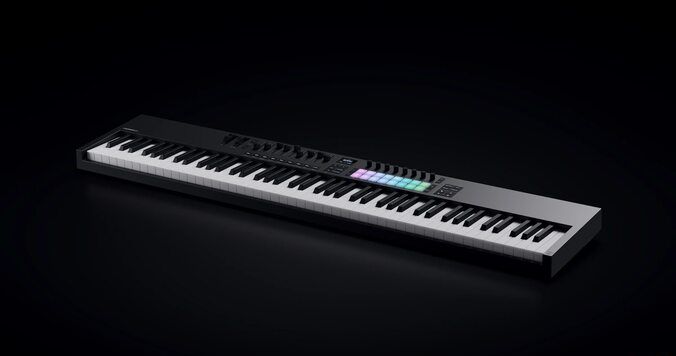
For two years, Novation left a gap in its own catalog. The MK4 range launched back in 2024 with five keybed sizes and a mountain of hype, but anyone who wanted the full 88-key experience got told to wait. That wait is over. Launchkey MK4 88 joins Novation’s line-up this week as the flagship of the family, and gear forums are already asking the obvious question: is this the 88-key controller serious players have been begging for, or just a bigger box wearing the same brain?
Short answer: it’s mostly the former, with a few real caveats you should know before you drop $449 on it. Let’s get into it.
🎹 TL;DR — Our Honest Take
The Launchkey MK4 88 is a genuinely useful controller for producers who need the full range and already like the Launchkey workflow — not a game-changer for anyone who owns a proper hammer-action board. It’s a smart, if unglamorous, way to round out the MK4 family. Read on before you buy.
So, What Exactly Is the Launchkey MK4 88?
Announced on July 14, 2026, the Launchkey 88 MK4 is now the largest controller in Novation’s current line-up. It rounds out the MK4 family to 10 controllers across six sizes and two colorways — a lineup that already ran from the $109 Launchkey Mini 25 all the way up to the Launchkey 61 in black and white.
What took so long? The MK3 generation actually had an 88-key model, but when MK4 launched in 2024, Novation quietly skipped it. Two years later, they’ve closed that gap with what they’re calling their “most expressive keybed yet” — a custom-designed, semi-weighted, waterfall-style action spread across seven-plus octaves.
Everything else about the Launchkey formula carries over: deep DAW integration, onboard creative tools, and a control surface built for people who’d rather touch a fader than click one.
The Spec Breakdown (No Fluff)
| Feature | Launchkey MK4 88 |
|---|---|
| Keys | 88 full-size, semi-weighted, waterfall-style keys (7+ octaves) |
| Pads | 16 velocity-sensitive FSR pads with polyphonic aftertouch, RGB clip-launch colors |
| Controls | 8 endless encoders, 9 faders, 9 fader buttons |
| Display | Central OLED screen (parameters, chord names, scale info) |
| Onboard tools | Scale Mode (30 scales), Chord Detector, Fixed Chord, User Chord, Chord Map, generative arpeggiator with 8-step editor |
| DAW integration | Ableton Live, Logic Pro, Cubase, FL Studio, Reason, Bitwig Studio, Ardour (new), plus Mackie HUI for Pro Tools |
| Connections | USB-C, sustain pedal input, 5-pin DIN MIDI out |
| Split/Layer | Yes — split keyboard into zones or layer two MIDI channels |
| Software bundle | Ableton Live Lite, Cubase LE, Novation Play, Melodics lessons, GForce synths, Orchestral Tools Parallel Orchestra, Klevgrand Slammer & LUXE, NI Komplete Select |
| Price | $449.99 USD / £379.99 / €378.14 |
The Missing Piece: What Novation Isn’t Telling You
Here’s where the press release goes quiet. Novation calls this their “most expressive keybed yet,” but notice what’s absent: no published key weight, no grams of resistance, no mention of hammer-action mechanics. This is still a semi-weighted action, not a true hammer-weighted piano feel. If you’re a classically trained pianist chasing realism, that word “semi” matters more than any marketing copy around it.
- No published weight or dimensions. An 88-key board is a serious piece of furniture. Novation hasn’t said how heavy this thing is, which matters if you’re hauling it to gigs or squeezing it onto a small desk.
- No case included. At this size, that’s a real added cost most buyers will end up paying separately.
- OLED longevity is an open question. Owners of other brands’ screen-equipped controllers have reported displays fading over time — worth watching in early reviews once units are in the wild.
- Still 16 pads. Even on the flagship model, the pad grid hasn’t grown. Fine for most workflows, but finger-drummers used to bigger grids won’t find more real estate here.
None of this is a dealbreaker. But a press release is written to sell you something — and it’s our job to point out what it leaves out.
Real Talk: How Does It Actually Stack Up?
If you already own a Native Instruments Komplete Kontrol S88 MK3, this won’t change your life. That board runs true hammer-action keys and tighter software-instrument mapping — but it also costs roughly double. The Launchkey MK4 88 isn’t trying to beat it. It’s aiming at the gap just below it.
Compare it instead to Novation’s own Launchkey 61 MK4. Same brain, same pads, same onboard tools — just 27 fewer keys and a lighter footprint. If you don’t genuinely need the extra range for two-handed piano parts or orchestral writing, the 61 does the same job for less money and less desk space. We break down exactly how the 61 compares to the rest of the field in our full ranking of the best MIDI keyboard controllers.
Against the Arturia KeyLab 88 MkII, it’s a closer fight — similar price bracket, similar target buyer. The deciding factor usually comes down to which DAW-integration ecosystem you’re already living in.
If you’re still using an entry-level 25 or 37-key controller and constantly wishing for more range, this is the upgrade you’ve been waiting for. If you own a proper hammer-action 88, this won’t replace it.
Who Should Actually Buy the Launchkey MK4 88?
✅ Buy This If You’re…
- A composer or arranger who needs the full range for two-handed parts
- Bouncing between Ableton, Logic, Cubase, FL Studio, Reason, Bitwig, or Ardour
- Finally centralizing a home studio setup around one main controller
- Someone who wants Scale and Chord tools built into hardware, not buried in plugin menus
❌ Skip This If You…
- Already own a hammer-action 88-key board like the Komplete Kontrol S88
- Are just starting out — a smaller Launchkey does the same job for less
- Work almost entirely in clip-launching or beat-making, rarely touching a full keyboard
- Have limited desk space — 88 keys is a genuine commitment
Total beginner and not sure an 88-key board is even the right call yet? Start with our guide to the best MIDI keyboards for beginners before you spend flagship money.
Setting It Up in Your Studio
One thing Novation gets right: setup is genuinely simple. A single USB-C cable handles power and data, and the DAW scripts load automatically — no manual mapping required. Add a sustain pedal, plug into your audio interface, and you’re playing within minutes.
If you’re building out the rest of your rig around this controller, don’t stop here. Check our pro recording studio equipment checklist to make sure you’re not missing anything, and pair it with one of the interfaces from our best audio interfaces roundup if you’re still shopping for one. And if your setup covers vocals too, a reliable workhorse mic like the Shure SM58 is still one of the smartest, cheapest additions you can make to a home studio.
The Verdict
The Launchkey MK4 88 joins Novation’s line-up not as a flashy reinvention, but as the missing puzzle piece the range needed. It won’t steal customers from the true hammer-action flagships, and it probably shouldn’t — that’s not the fight it’s picking. What it does deliver is the full Launchkey workflow, in full 88-key form, at a price that undercuts most serious alternatives by hundreds of dollars. For the right buyer, that’s not hype. That’s just a smart upgrade, finally available.
Does the Launchkey MK4 88 look like a winner to you, or is $449 too steep for what’s essentially a bigger Launchkey 61? Let us know in the comments below.


