Mix feedback has always been a mess — scattered voice notes, vague timestamps, and endless email chains that leave you guessing which version your client actually heard. Talkback, the new browser-based mix review tool built by I/O Music & Design, is here to change that. The verdict? It’s the smartest, cleanest solution for modern mix collaboration we’ve seen — and it’s built specifically for how producers and engineers actually work in 2026.
What Is Talkback, Exactly?
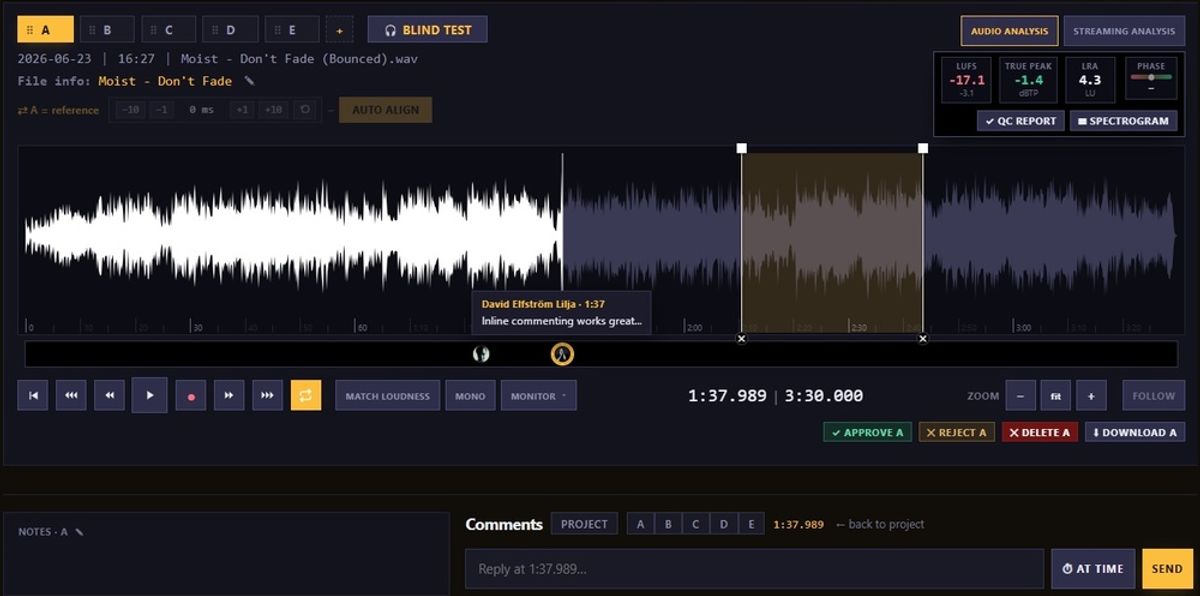
Talkback is a private mix review platform. You upload your audio, invite collaborators via a password-protected link, and they leave timestamped comments pinned to the exact moment on the waveform — no account required on their end. Think of it as your own private listening room that exists in the browser. Nobody hears your music except the people you invite. No AI. No strangers. Just your actual people.
It runs entirely in the browser. There’s nothing to install, no plugin to crash your session, and your clients don’t need to sign up for anything. You pay; they listen and comment. That alone is a game-changer if you’ve ever lost a client because they couldn’t figure out how to use your previous review tool.
The Spec Breakdown
| Feature | What It Does |
|---|---|
| A/B/C Version Compare | Flip between mix revisions gaplessly, sample-accurate, same playback position |
| Timestamped Comments | Clients click the waveform to leave notes at the exact millisecond |
| Overdub Takes | Record a vocal idea or hum a part directly over the mix, synced to the song |
| Lossless Download | Stream a compressed preview; approved mixes download in full quality |
| QC / Loudness Tools | LUFS, True Peak, LRA, phase meter, spectrogram — pass/warn/fail reports per version |
| Streaming Codec Sim | Hear your master as Spotify, Apple Music, YouTube, Tidal, Amazon, or Deezer would deliver it |
| Blind A/B & Loudness Match | Match levels across versions; hide which is which until after you choose |
| Album Mode | Review a whole record track by track with continuous play and per-song comments |
| Share Links | Password-protected, no reviewer account needed, optional link expiry |
| Pricing | €7/mo (Indie), €15/mo (Studio), €39/mo (Label) — 14-day free trial |
What the Press Release Doesn’t Tell You
Here’s what I noticed after digging into the details. Talkback keeps the audio private and never uses AI to analyze or summarize feedback — that’s explicitly stated. But there are a few questions worth raising before you commit.
The streaming codec simulation is genuinely impressive, but the accuracy depends on how closely the encoding matches what each platform actually uses internally. These platforms update their encode chains regularly, so this feature will need ongoing maintenance to stay accurate. Worth watching.
The 100 GB Indie plan fills up faster than you think when you’re uploading lossless masters. A 24-bit/96kHz stereo master can easily run 500MB+ per song. If you’re managing multiple album projects simultaneously, you’ll likely need the Studio tier at €15/mo sooner than expected.
Also: the forensic watermarking (for leak tracing) is only available on the Label plan at €39/mo. If you’re mixing for artists releasing on independent labels — and leak protection matters to your clients — that’s the tier you need from day one, not an upgrade you add later.
How It Stacks Up Against the Competition
The obvious comparison is SoundCloud for Private Sharing, which many producers still use for client feedback. But SoundCloud compresses everything, gives you no version control, and comments are a mess of “sounds good!” with zero timestamps. Talkback blows it out of the water for professional use.
Splice and Dropbox are popular workarounds for sharing files, but they’re not review tools. They have no waveform player, no timestamped comments, and no streaming codec simulation. If you’re still sending WAV files via Dropbox and getting back a voice memo from your client, Talkback is the upgrade you’ve been waiting for.
The closer competitor is platforms like LANDR’s collaboration tools or Splice’s review features — but none combine lossless sharing, streaming simulation, blind A/B testing, and overdub recording in one clean interface at this price point. The €15/month Studio plan is genuinely competitive against tools that do half as much.
If you’re already deep in a DAW-native workflow and need to understand your audio interface routing before getting feedback from collaborators, Talkback fills the gap between your recording setup and your client’s ears. And if you’re building out your monitoring chain to check mixes accurately before you even share them, our guide to the essential recording studio equipment is worth reading first.
Who Should Actually Buy This?
✅ Buy Talkback If You…
- Mix for clients who aren’t audio professionals — the no-account reviewer experience is worth it alone
- Work on multiple revisions of the same song and need clean version control
- Want to hear how your master translates across streaming platforms before you deliver
- Record bands or artists remotely and need overdub idea capture built into your review flow
- Work with labels or managers who need approved lossless downloads — not compressed previews
❌ Skip Talkback If You…
- Only produce for yourself and never send mixes to clients or collaborators
- Already have a robust project management system with audio review baked in (e.g., a full studio with dedicated staff)
- Need MIDI or multitrack stem-level feedback — Talkback works on stereo mixes, not individual tracks
- Are on a zero-budget and only send mixes via text — though at €7/mo, the Indie plan is hard to argue with
The Standout Features Worth Talking About
The Streaming Codec Simulator
This is the one feature no other tool at this price does. Pick Spotify, Apple Music, YouTube Music, Tidal, Amazon Music, or Deezer — then pick a quality tier — and Talkback encodes your master and lets you hear it the way that platform delivers it. Switch between the original, the encoded version, and the difference (what the encoder threw away). That difference signal is genuinely revealing. It’s a pro mastering check built directly into your review flow.
Pair this with a good pair of closed-back studio headphones and you’re catching problems before your listeners ever hear them. Most bedroom producers and home studio engineers skip this step entirely — Talkback makes it effortless.
Overdub Takes
This one caught me off guard. Instead of a client typing “the chorus feels flat, maybe something more melodic at 1:32?”, they can just record a vocal idea directly over the mix — synced to the song, right in the browser. It’s the difference between feedback you have to interpret and feedback you can actually use. Singer-songwriters and artists who struggle to articulate mix notes in words will love this.
Album Mode
Drop a folder of tracks and Talkback lays out a full album player — each song numbered, draggable to reorder, with its own A/B/C version tabs. Continuous playback rolls from one track to the next automatically. Label reviews, final album approvals, sequence checks — this makes all of it clean and professional. It’s not just for big studios either. Any independent artist releasing an EP will appreciate having one link that plays the whole record properly.
Getting the microphone performance right before you even start mixing matters just as much as the tools you use after. Check out our picks for the best vocal microphones under $200 to make sure you’re capturing the best possible source before it ever hits a mix review.
⭐ Bottom Line: Talkback is the missing link between finishing a mix and getting clear, actionable feedback — at a price that makes skipping it hard to justify.
Whether you’re a bedroom producer sharing rough ideas with your bandmate or a mix engineer juggling client revisions across multiple albums, Talkback solves a real problem in a way that feels like it was designed by someone who’s actually been in that studio chair. The A/B/C version compare alone is worth the monthly cost. Everything else — the streaming simulation, the overdub takes, the lossless approval workflow — is what pushes it from “useful tool” to “I can’t imagine working without this.”
Does Talkback look like the tool your studio workflow has been missing, or is there a feature gap that’s keeping you on whatever you’re using now? Let us know in the comments below.
🔗 Learn more and start your free 14-day trial: talkback.se