Getting genuinely interesting, organic movement into a mix has always required either serious skill or expensive tools. Most glitch and granular plugins either overwhelm you with complexity or underwhelm you with results. Baby Audio HyperWarp just arrived — and it’s neither of those things. Our verdict? This is the most approachable and playful granular effect plugin released in years, and at a $49 launch price, it’s an easy call for most producers.
What Exactly Is HyperWarp?
HyperWarp is a granular multi-effect plugin from Baby Audio — the team behind cult favourites like TAIP, Super VHS, and the Grainferno synth. It works as an insert effect in any major DAW, available in VST, VST3, AU, and AAX formats for both Mac and Windows.
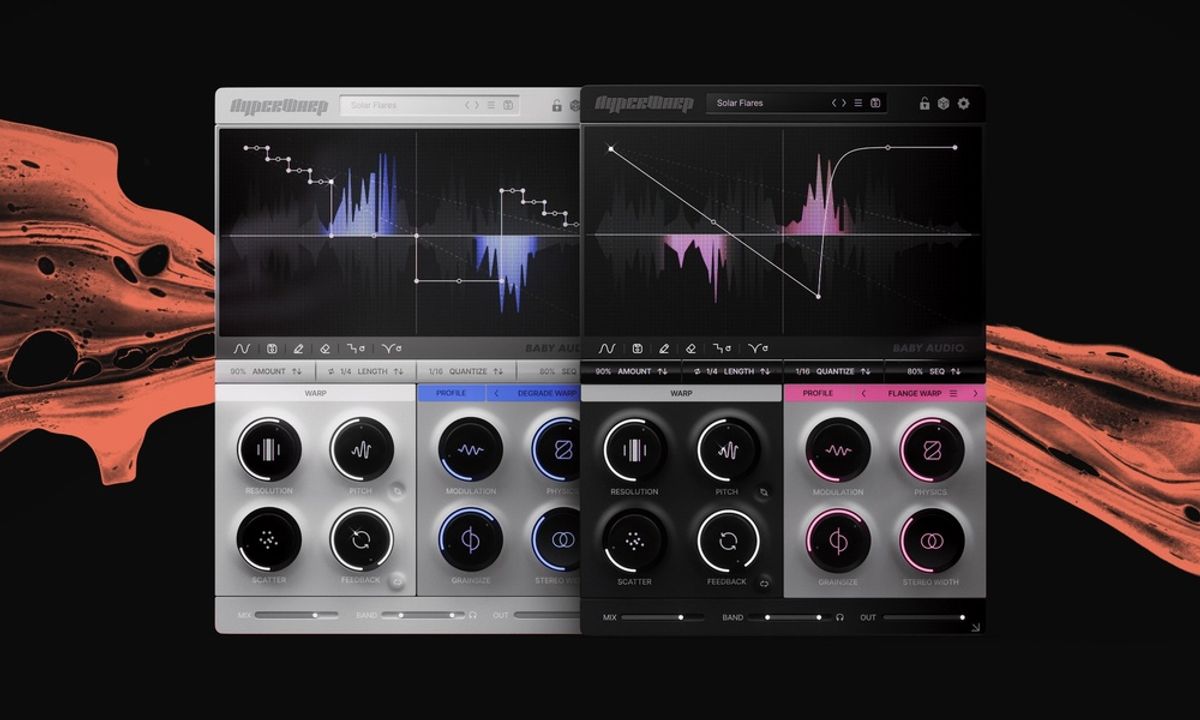
The core idea is simple: HyperWarp breaks your audio into tiny microscopic slices, then reassembles those slices based on a sequence you draw into a visual graph. Draw a flat line and your signal plays normally. Draw steps and you get stutters. Curve it downward for a tape-stop. Flip it backward for reverses. The shape you draw is the effect.
The Spec Breakdown
| Price | $49 (intro) / $99 full price (offer ends Nov 30, 2026) |
| Formats | VST, VST3, AU, AAX (64-bit only) |
| Platforms | macOS 10.13+ (Apple Silicon native), Windows 10+ |
| DAW Support | Ableton, Logic, FL Studio, Pro Tools, Cubase, and more |
| Profiles | 7 (Clean Warp, Flange Warp, Degrade Warp, Filter Spam, Harmo-Nicer, Fauxcoder, Lo-Fizzly) |
| Presets | 190+ curated by professional sound designers |
| Free Trial | Yes — available at babyaud.io |
| AI-generated? | No — built entirely by human engineers |
The Seven Profiles — This Is Where It Gets Interesting
Most granular tools give you one sound flavour and let you tweak endlessly. HyperWarp gives you seven entirely different sonic characters, each with its own set of four macro controls.
- Clean Warp — Crisp, transparent time manipulation. Great for half-time edits on drums.
- Flange Warp — Tight, squeaky grain effects. Think sci-fi movement on synths.
- Degrade Warp — Lo-fi time disruption with a gritty, granular edge.
- Filter Spam — Per-grain filter motion. Unpredictable and chaotic in the best way.
- Harmo-Nicer — Builds harmonic density using pitch-shifted grains. Lush on pads.
- Fauxcoder — Resonant, vocoder-adjacent textures. Seriously strange on vocals.
- Lo-Fizzly — Granular downsampling that fizzes and crackles in a satisfying way.
This isn’t just one sound with a new label slapped on. These profiles genuinely produce different results. That’s a big deal for reusability — you’re not buying a one-trick plugin.
What They’re Not Telling You
The marketing is smooth. But here’s what Baby Audio isn’t highlighting in big letters: HyperWarp can only work with audio that’s already passed through its buffer. It looks back in time — it can’t look forward. So if you’re expecting it to work predictively like a beat-synced stutter effect on an incoming live signal with zero preparation, you’ll need to plan around that.
The graph interface is also genuinely new to most users. If you’re used to dropping presets and moving on, the learning curve on the graph editor is real. Baby Audio has released tutorial videos specifically to address this — which tells you they know it needs explaining.
Also worth noting: this is 64-bit only. Older DAW setups or legacy plugin chains running 32-bit bridging won’t play nicely here. If your studio runs everything through an older interface setup, check out our guide to the best audio interfaces before adding new plugins to the mix.
How Does It Compare to What’s Already Out There?
The granular effects space isn’t empty. iZotope Stutter Edit 2 has been the go-to glitch tool for serious producers — but it’s complex, expensive, and built around a performance mindset. If you already own Stutter Edit 2 and use it regularly, HyperWarp won’t completely replace it. They approach glitch from different angles.
But if you’re still reaching for basic DAW clip-launch tricks or a basic granular delay to add movement to your loops? HyperWarp is the upgrade you’ve been waiting for. Grammy-winning producer M-Phazes called it exactly the kind of tool that “mangles a sound in unexpected ways.” That endorsement lands because it’s accurate — not because it’s marketing copy.
For producers who love working with loops and samples, pair this with a solid DAW setup and it becomes a serious weapon for standing out from the crowd of producers all working from the same sample packs.
Who Should Actually Buy HyperWarp?
✅ Buy This If…
- You produce electronic, hip-hop, or experimental music and want movement in your sounds
- You work heavily with loops and stems and want to make them your own
- You’re a bedroom producer who finds tools like iZotope Stutter Edit too complex or expensive
- You love happy accidents and want a plugin that rewards experimentation
- You want a one-stop granular toolkit rather than five separate plugins
- You need a free trial before committing — Baby Audio offers one
⏭ Skip This If…
- You already own and actively use iZotope Stutter Edit 2 and it covers everything you need
- You run a 32-bit plugin chain or an older legacy DAW setup
- You only produce acoustic or singer-songwriter material with no interest in glitch or texture effects
- You’re not ready to invest time learning the graph interface — it rewards patience
The Bottom Line
Baby Audio has built a reputation for hiding serious power behind approachable, fun interfaces — and Baby Audio HyperWarp continues that tradition. The graph takes a little getting used to. But once it clicks, you’re not going back. Whether you’re building a home studio from scratch (check our recording studio equipment checklist for everything you need) or you’re a seasoned producer hunting for something genuinely fresh, HyperWarp earns its place in your plugin folder. At $49 through November 30th, 2026, the timing doesn’t get much better.
Does Baby Audio HyperWarp look like a winner to you — or is even a $49 plugin hard to justify right now? Drop a comment below. We’d especially love to hear from anyone who’s already tried the free trial and what you think of the graph interface on first use.