

As a music producer, engineer, or audio professional, you know the importance of having the right tools for your craft. One of these is an audio interface to record and playback sound in your studio. Audio interfaces are used in recording studios, post-production houses, radio stations, live sound reinforcement applications, and more! This article is a beginner’s guide to audio interfaces and how to use them.
What is an audio interface?
An audio interface is the key component of any recording studio. It is a piece of hardware that allows you to connect microphones, instruments, and other audio devices to your computer. It’s also used to send audio out from your computer (to connect speakers or studio monitors).
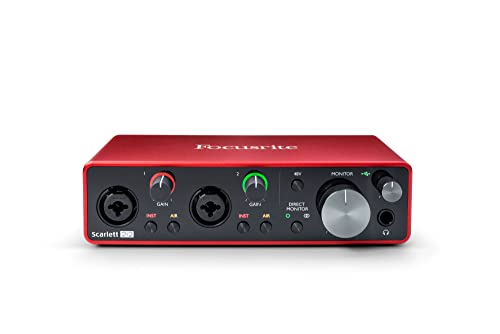
It will also allow you to manage the audio inputs and outputs of your computer. For example, you can configure an audio interface to route vocals through one set of speakers while sending your guitar signal through a different set of speakers or amplifiers.
It’s important to have an audio interface if you want to record or produce music or podcasts on a computer.
Is an audio interface the same as a computer sound card?
No, an audio interface and a sound card are not the same. A sound card is a component that’s built into your computer. It allows your computer to play audio files and connect to audio devices like speakers and microphones.
An audio interface is a separate piece of hardware that connects to your computer. It provides more features and options than a sound card, such as the ability to connect multiple audio devices at once.
Why use an audio interface?
There are audio adapters built into your computer, but they cannot compete with audio interfaces. They don’t have the audio fidelity or capabilities of an audio interface.
For example, many audio interfaces can support multiple inputs and outputs at once—even different types of audio signals. They’ll also allow you to control your audio signal with software, which can be extremely helpful in a recording scenario.
They also give you studio-quality audio, audio interfaces use higher audio quality than a computer’s audio inputs and outputs which can impact how clean your audio is and the overall audio quality.
Connecting an audio interface to a computer
The most common way to connect an audio interface to a computer is via USB. But there are also audio interfaces that use FireWire, Thunderbolt, or even Ethernet connections. Each connection type has its own benefits and drawbacks.
USB: USB is the most common connection type and is usually the least expensive.
Firewire: Firewire is faster than USB, but Firewire audio interfaces are less common these days and can be difficult to find.
Thunderbolt: Thunderbolt is the fastest connection type, but it can be expensive.
Audio interface inputs & outputs
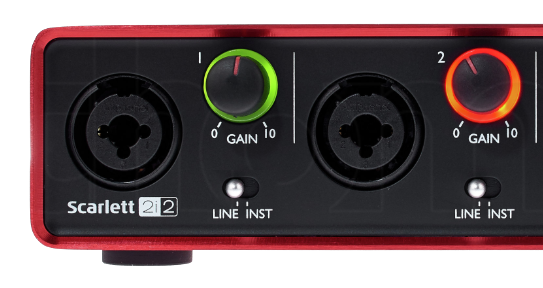
An audio interface will have a number of inputs and outputs. The most common inputs are the XLR microphone inputs and instrument inputs, which allow you to connect microphones and other instruments to the audio interface.
The most common output is a headphone output, which allows you to connect headphones to the audio interface. However, most audio interfaces also have studio monitor outputs, which allow you to connect studio monitors to the audio interface.
Audio interface MIDI inputs and Outputs

Many audio interfaces also have MIDI inputs and outputs. MIDI is a protocol that allows you to connect electric pianos/keyboards, synthesizers, drum machines, and other MIDI devices to the audio interface. This can be then used to control the software instruments in your recording software.
MIDI also allows you to control electronic instruments such as synthesizers via the computer. If you want to use MIDI, make sure the audio interface you choose has MIDI inputs and outputs.
Mic Preamps in an audio interface
A Mic Preamp takes the audio signal from your microphone and adds gain to it. This is important because microphones produce very weak signals, which need to be amplified before they can be recorded.
Most audio interfaces have at least one Mic Preamp, and some audio interfaces have eight or more. If you plan on using a lot of microphones, you’ll need an audio interface with multiple Mic Preamps.
Phantom Power on audio Interfaces
Some audio interfaces have the ability to provide Phantom Power via one or more of their XLR inputs. Phantom power is a special type of electricity that some microphones need to function properly.
It’s important to note that some audio interfaces only provide Phantom Power on certain audio inputs and not others, so check before you buy if this matters for your needs.
What microphones need phantom power?
Phantom power is required by microphones that need external power, the type of mics that need phantom power are condenser microphones. Dynamic microphones do not require phantom power.
Not all microphones need phantom power to function. If you’re not sure if your microphone needs phantom power, check the documentation that came with your microphone or contact the manufacturer.
Direct Input (DI) audio input
An audio interface will usually have one or more Mic preamps. However, they are not always necessary if you’re recording a signal that is already amplified, such as guitar or keyboard. In this case, you can use a DI (Direct Injection) input to connect the instrument to the audio interface.
A Direct Input (DI) is an audio input that bypasses the audio interface’s preamps. This means that you can connect a keyboard or electric guitar directly to the audio interface without using its Mic Preamps. By using the audio interface’s DI inputs, you can avoid overloading the audio interface’s preamps.
A/D & D/A converters
Audio interfaces typically have analog-to-digital (A/D) and digital-to-analog (D/A) converters built-in. An analog audio signal from your microphone or guitar will get converted into a digital audio signal by the audio interface’s A/D converter before being sent into your computer.
Audio interfaces also have digital-to-analog (D/A) converters that are used to convert audio signals from your computer back into analog audio signals that can be heard through your studio monitors or headphones.
Audio Interface Sound Quality
When choosing an audio interface, audio quality is one of the most important factors. Higher audio quality will provide better sound quality when recording or playing audio in your studio.
Various audio interfaces have different audio qualities. If you’re recording audio for music production, then it’s recommended that you choose an audio interface that has a sampling rate of at least 44.1 kHz/24-bit audio quality.
Sample Rates and Bit Depths
Sample Rate and Bit Depth are two audio settings that you’ll want to pay attention to when purchasing an audio interface.
Sample Rate refers to the number of audio samples that are captured per second. The most commonly used sample rates are 44.1 kHz or 48 kHz.

Bit-depth refers to the number of bits used to store each audio sample. Most audio interfaces have a Bit Depth of 16 or 24 bits.
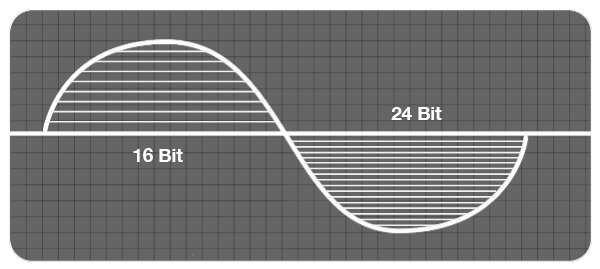
Higher Sample Rates and Bit-depths will produce better audio quality, but they will also require more computer resources.
Sample Rate and Bit Depth Examples
44.1kHz/16-bit: This is the audio quality that is common on CDs.
44.1kHz/24-bit: This is a higher quality audio file that will provide better audio quality than 44.1kHz/16-bit. It is the most common audio quality that is used for music production and recording.
48kHz/16-bit: This is the audio quality that is common on DVDs.
48kHz/24-bit: This sample rate and bit depth is commonly used for video production.
192kHz/24-bit: This is the highest quality audio that you can currently capture with an audio interface. It will provide the best audio quality, but it will also require more computer resources.
The recommended sample rate and bit depth for music production and recording
If you’re recording audio for music production, it’s recommended that you choose a sample rate of at least 44.1kHz/24-bit or higher. But 44.1kHz/24-bit is a good starting point for most people.
For more information check out this article: Sample Rate and Bit Depth Explained
Audio Interface Latency
Latency is the time that it takes for an audio signal to travel from the audio interface to the computer and back. Latency can be a problem when recording audio, because it can cause audio delays.
Some audio interfaces have low latency, while others have high latency. If you’re going to be recording audio, you’ll want to choose an audio interface that has low latency.
If you’re not going to be recording audio, then audio interface latency doesn’t matter.
What to consider when buying an audio interface?
If you’re looking to buy an audio interface, there are a few things you need to consider:
– Number of inputs and outputs: How many devices do you want to connect at once?
– Connectivity: USB, Thunderbolt, FireWire?
– Audio quality: Sampling rate and bit depth?
– Latency: Low latency is ideal for recording audio.
– Price. How much are you willing to spend?
When choosing an audio interface, you need to consider your needs and budget. If you’re just starting out, a USB audio interface is a good option.
Conclusion
An audio interface is an essential piece of hardware for any musician or audio producer. It allows you to connect microphones, instruments, and other audio devices to your computer. It also allows you to manage the audio inputs and outputs of your computer. If you want to record or produce music or podcasts on a computer, you need an audio interface.
If you’re looking to buy an audio interface check out our guide to the Best Audio Interfaces.