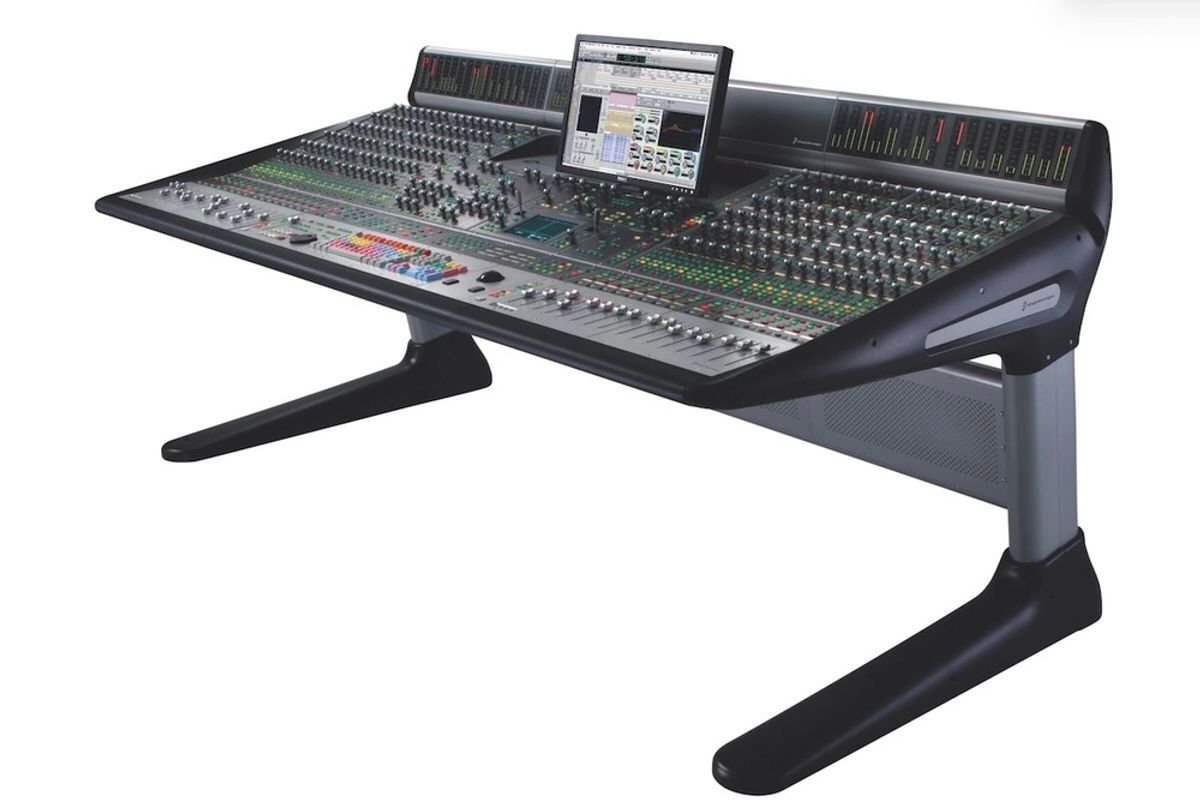
Pro audio studios running Apple Silicon Macs have been stranded. The Avid D-Control — a heavyweight console once found in premier recording facilities worldwide — went silent the moment engineers upgraded their machines. No official Avid fix. No path forward. Then Neyrinck brings back Avid D-Control from the hardware graveyard with a new feature called D-Control Basic, packed directly into V-Control Pro. My verdict? For studios still running a D-Control frame, this is real, practical news — with one honestly acknowledged asterisk attached to it.
What D-Control Basic Actually Gets You
Neyrinck is completely upfront: this is not full console integration. They named it “Basic” deliberately. The feature mirrors what V-Control Pro already delivers for D-Command users — meaning only the bottom two rows of encoders on each channel strip are active. The top four rows stay dark.
| ✅ What Works | ❌ What Stays Dark |
|---|---|
| Transport control | EQ section |
| 16 or 32 motorized faders (0.1 dB resolution) | Dynamics section |
| Pan, mute, solo, record arm, track select | Reassignable focus strip |
| Automation modes | Soft key sections |
| Sends A–E (with flip to faders) | Sends beyond E |
| Inserts A–E on strips 1–8 | Inserts beyond E on other strips |
| X-Mon monitor control (fully active) | Top four encoder rows per strip |
Configuration supports one D-Control Main unit plus up to two Fader Modules — 32 channels maximum. Devices connect over Ethernet. Pro Tools only. Logic Pro, Cubase, Studio One, and other DAW users are not supported at this time. If you’re still deciding on a primary DAW, our guide to the best DAW software for music production breaks down exactly where Pro Tools fits in the modern landscape.
The Part the Press Release Glossed Over
D-Control Basic runs on the HUI protocol — reliable and proven, but not EUCON, the native Avid protocol your D-Control was engineered for. In practice: fader resolution is effectively halved compared to a full EUCON implementation. You control four knobs at a time. You bank through 32 tracks maximum.
The celebrated EQ and Dynamics hardware sections — two of the biggest reasons pros fell in love with the D-Control — stay completely dormant. Paul Neyrinck put it plainly: they’re giving you “a working console instead of a dead one.” That’s an honest sell. But if dedicated EQ and dynamics hardware control was central to your sessions, you’ll feel that absence.
How It Stacks Up in the Real World
If you’re already running an Avid S6, move on — you’re in EUCON territory with native deep integration and none of this applies to you.
But if you’re staring at a D-Control frame collecting dust since your M-series Mac upgrade? This is $299 versus a six-figure hardware replacement. The math isn’t close. Think of D-Control Basic the way you’d think of the right audio interface for your DAW setup — it’s not the most glamorous piece of the puzzle, but without it, nothing else moves.
Should You Actually Buy This?
✅ Buy It If…
- Your D-Control went dark after upgrading to an Apple Silicon Mac
- Pro Tools is your primary — and only — DAW
- Your workflow centers on faders, transport, and mix automation
- You want motorized hardware faders without buying a brand-new surface
❌ Skip It If…
- You need the EQ and Dynamics sections fully operational
- You run Logic, Cubase, Studio One, or anything other than Pro Tools
- You don’t already own D-Control hardware
- You need more than 32 channels of simultaneous hands-on control
💰 Price & Availability
V-Control Pro Plus 2 license: $299 (regularly $349) — a perpetual license with zero subscription fees. Available now. Building out the rest of your studio at the same time? Our pro recording studio equipment checklist covers everything you need alongside a surface like this, and our guide to the best studio headphones will make sure your monitoring chain is dialed in while you mix.
When Neyrinck brings back Avid D-Control from obsolescence for $299, the value story is hard to argue with — if you’re already a Pro Tools studio with idle hardware. It won’t restore a full-featured console experience, and engineers who lived inside the EQ and Dynamics strips will feel that gap immediately. But for the core workflow of faders, automation, transport, and sends? This turns a very expensive paperweight back into a serious production tool. So — is D-Control Basic the rescue your studio has been waiting for, or is half a working console not enough to justify the cost? Drop your take in the comments below.